APEX Interlock: Enterprise-Grade MCP Security and AI Governance
Interlock adds an MCP GRC (Governance, Risk, Compliance) layer between your AI Agents and business systems. It checks requests, blocks risky actions, and keeps a record for audits.
- Governance: Set clear rules for agents.
- Risk:Block unsafe agent actions.
- Compliance: Keep audit records ready.
Get your free MCP risk check
Your details are used only to prepare your check.
One Control Layer Across Your APIs and MCP Servers.
Interlock connects to the cloud platforms you already run, finds every API, MCP server and agent, scores the risk, and shows you what to fix and how it maps to your compliance frameworks.
Your platforms
Existing APIs and MCP servers
AWS
API Gateway, AgentCore
Google Cloud
Apigee, API Hub
Azure
API Management
MCP servers
Self-hosted or SaaS
Connected read-only
APEX Interlock
Governance, risk and compliance for your APIs and MCP servers
Unified inventory
Every API, MCP server, tool and agent, and what each one can reach.
Risk engine
Checks for open or unauthenticated access, excess permissions, sensitive data exposure and hidden (shadow) agents. Gives each a risk score from 0 to 100.
Governance
- Security
- Auditing
- Rate limits
- Performance measurement
- Token cost control
Compliance
- ISO 42001
- EU AI Act
- AIUC-1
- MITRE ATLAS
What your team gets
Visibility, control and audit readiness
Dashboard
Alerts
New risks sent to Slack, Teams or Jira.
Audit evidence
Reports per framework, ready for auditors.
The Risks of Uncontrolled AI Agents
Teams connect AI agents to business systems quickly, but often lack clear rules to control access and track actions.
Open access
Some MCP servers lack proper checks, allowing unauthorised access to business systems.
Too much access
AI agents may get more access than needed, increasing MCP security risks.
No clear records
Without MCP audit records, teams cannot easily track agent actions or support audits.
How APEX Interlock Keeps AI Agents Safe
See how APEX Interlock improves MCP security by checking agent access, blocking unauthorised actions, enforcing rules, and keeping a record of every action.
Today
4 risks found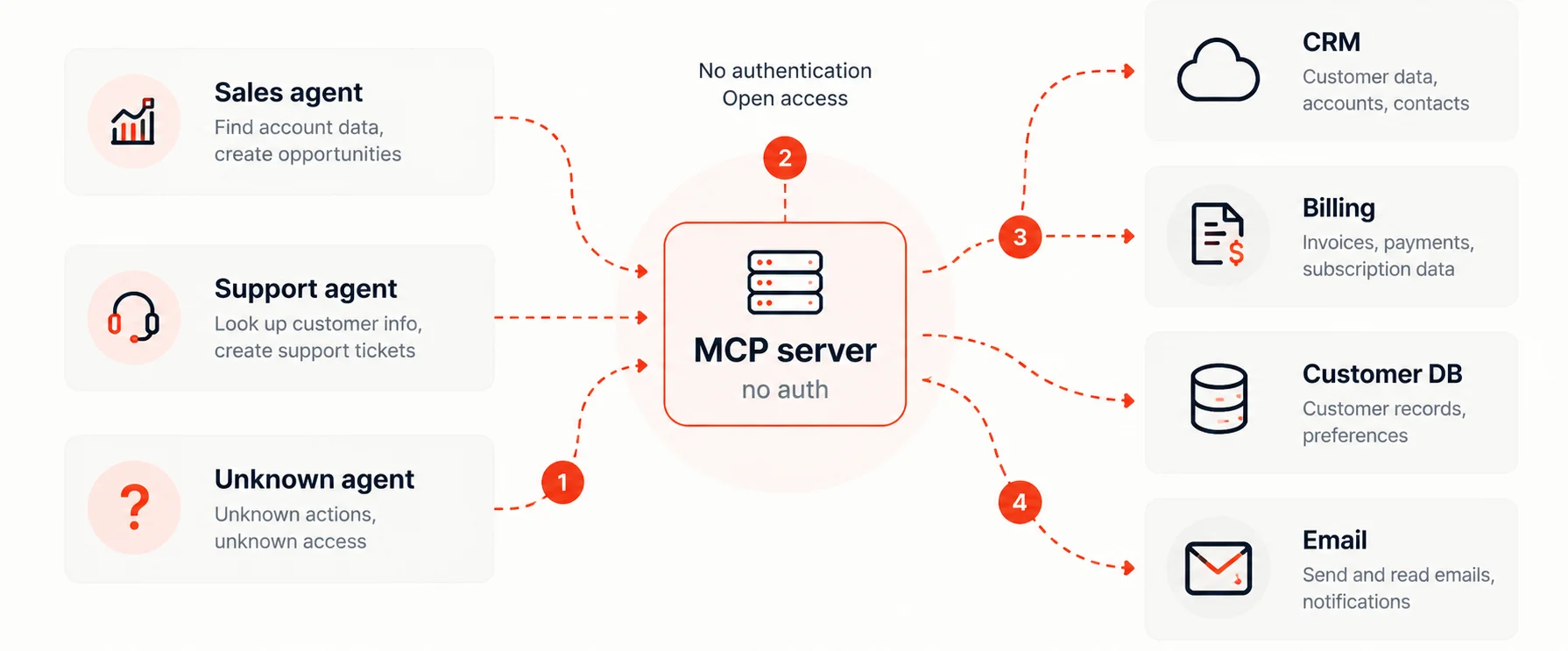
- ✕Unapproved agent
- ✕No authentication
- ✕Billing writes allowed
- ✕Nothing logged
With APEX Interlock
Controls in place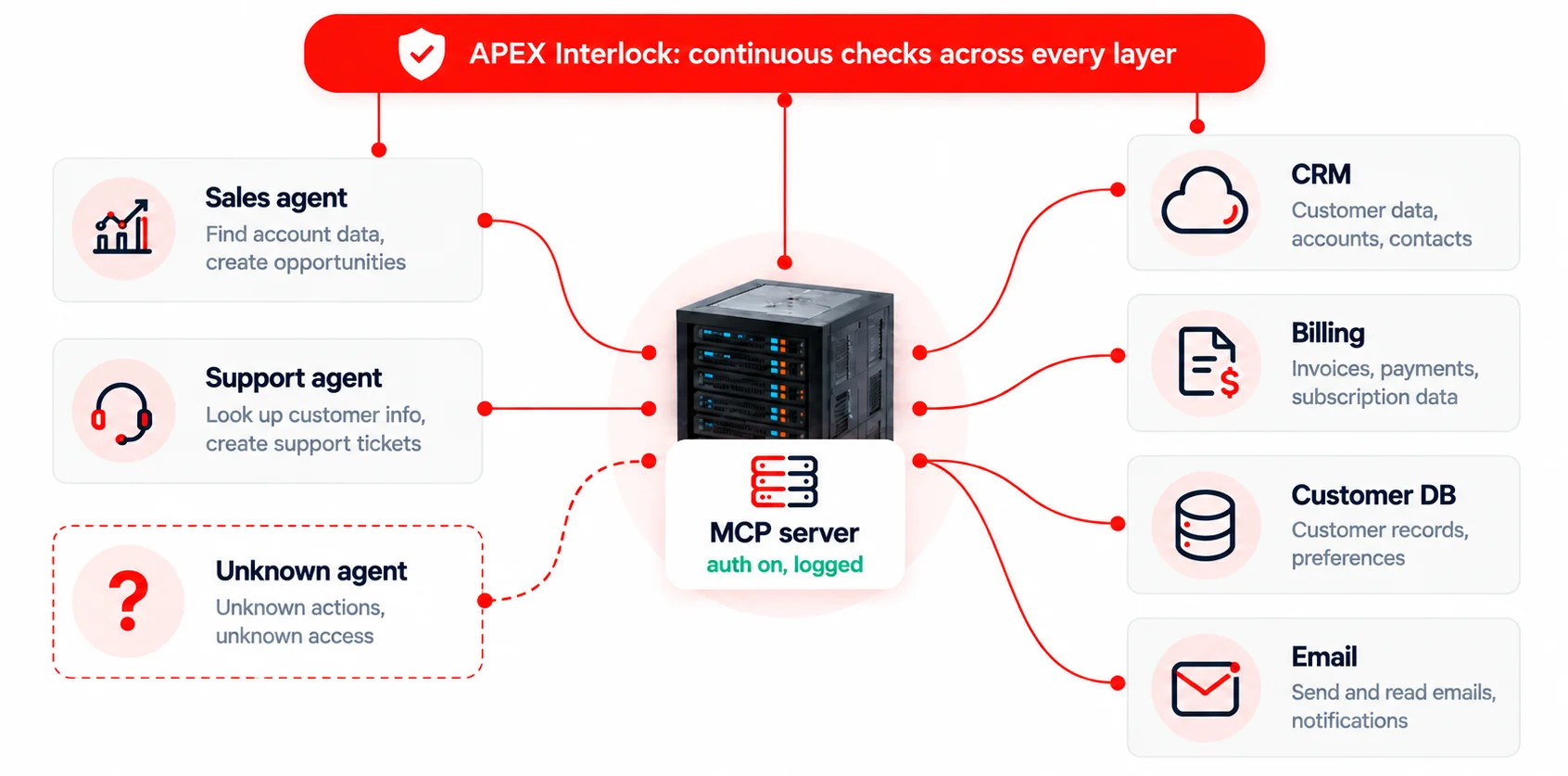
- ✓Unknown agents flagged
- ✓Authentication enforced
- ✓Billing is human only
- ✓Every action logged
Find and Fix MCP Security Gaps
Interlock checks your MCP setup in three steps, finds security gaps, and helps you fix them.
- payments-mcpRegistered
- crm-mcpRegistered
- sales-agentRegistered
- test-serverNot registered
Why Interlock
Built for teams that need answers, not another platform rollout.
- ISO 42001
- EU AI Act
- MITRE ATLAS
- AIUC-1
Works across platforms
AWS, Microsoft, Zoho, Salesforce or custom agents, in one view.
Fast to start
No agents to install, no traffic to reroute, no production access.
Security and compliance together
Technical findings tied directly to the controls auditors ask about.
Engineers included
Azilen engineers walk you through findings and help you fix them.
Same AI agent. Two very different endings.
Two real cases where an AI agent went beyond its limits. Switch between the two views to see how each one goes, without Interlock and with it.
PocketOS AI coding agent working on a test environment
The agent found a key it should never have used
- 1Assigned taskFix a small issue in the test environment
- 2Agent exploresAgent asks for accessFinds a powerful key with very broad accessTries to use that key to reach the live system
- 3Uses the keyInterlock steps inReaches the live production systemSees the agent leaving its test area, blocks the delete, and asks a person
- !✓Deletes dataAction blockedThe production database and its backups are goneThe agent is told no, and pointed to what it may use
Replit AI coding agent building an app
The agent did not follow a clear instruction
- 1Human instruction“Code freeze: no changes to production”
- 2Agent carries onAgent tries to actKeeps working on the database anywayTries to change the database
- 3Runs the changesInterlock steps inDeletes the production databaseSees the freeze rule, blocks the request, and alerts a person
- !✓Business impactAction blockedAbout 1,200 executive records are lostNo changes reach production, and a person is told





 Talk to Our
Consultants
Talk to Our
Consultants Chat with
Our Experts
Chat with
Our Experts Write us
an Email
Write us
an Email