



 19 mins
Jul 17, 2025

Computer vision is an AI technology that enables machines to interpret images and video captured across stores, warehouses, and fulfillment centers.
Instead of simply recording footage, computer vision recognizes products, people, shelves, shopping carts, checkout activity, and store conditions.
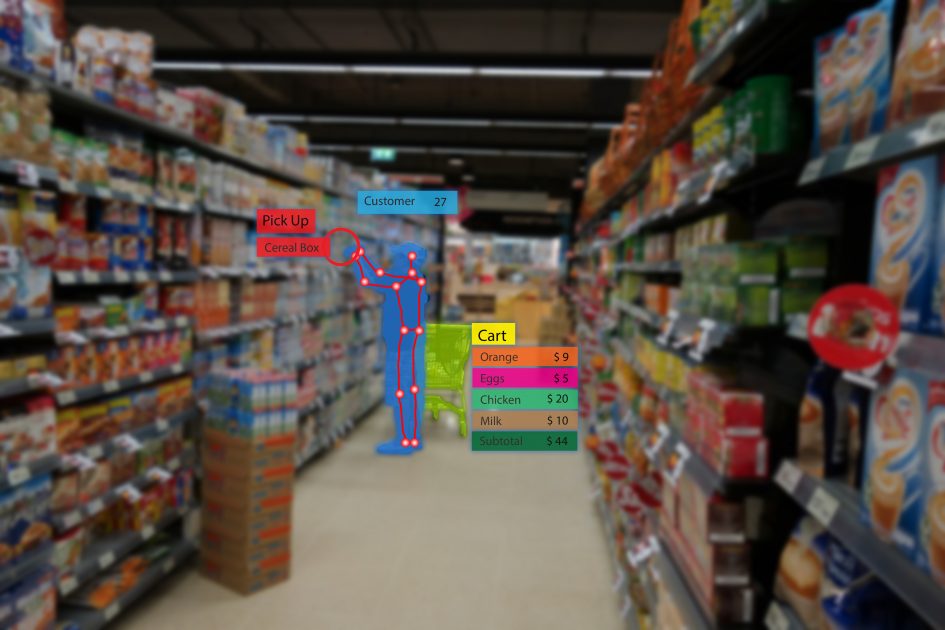
Unlike traditional surveillance systems that store video for later review, computer vision processes visual information continuously and converts it into operational insights.
A typical retail computer vision system combines several components:
→ Existing IP or CCTV cameras for visual input
→ Edge AI devices for low-latency processing
→ Vision models for product and object recognition
→ Business rules that trigger actions
→ Integrations with POS, ERP, and inventory systems
→ Analytics dashboards for store managers
The conditions converging in 2025 and 2026 are creating a unique window.
The technology is mature. The infrastructure is ready. The business pain is acute.
Retail shrinkage has reached $112.1 billion in annual losses – an $18 billion year-over-year increase, according to NRF’s most recent data.
Shoplifting rose 24% in the first half of 2024 alone, and Capital One predicts it could cost retailers over $150 billion by 2026.
Traditional responses – increased surveillance staff, reactive investigation, locked merchandise – are expensive, friction-heavy, and don’t address the root of the issue. But computer vision does.
97% of retailers plan to maintain or increase their AI investments in 2026.
In fact, NVIDIA’s State of AI in Retail and CPG survey found over 80% of retail and CPG companies were either using generative AI or piloting projects, with 87% saying AI had a positive impact on increasing annual revenue and 94% reporting AI has helped reduce annual operational costs.
Minimum wage increases across US states and Canadian provinces have made manual, labor-intensive store operations increasingly expensive.
Shelf audits, queue monitoring, planogram checks, and compliance verification that once required human presence are now candidates for automation – not because the technology is available, but because the economics now demand it.
Most mid-to-large retail stores already have IP camera networks, cloud connectivity, and Wi-Fi.
North America’s dominance in the computer vision market is partly attributable to its dense IoT deployment base and robust edge and cloud infrastructure – the foundation that makes retail computer vision deployment fast and cost-effective.
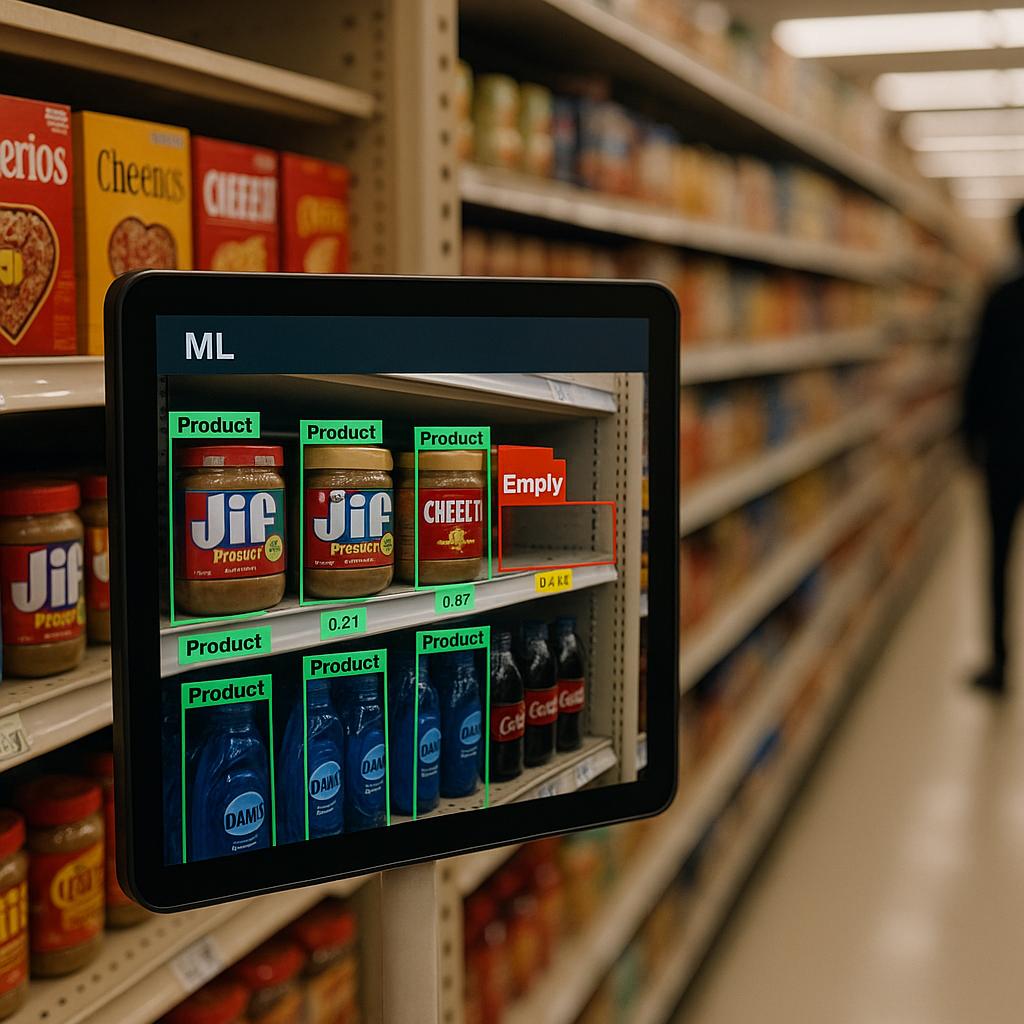
Computer vision continuously monitors product availability and helps teams respond before customers encounter stock outs.
Key capabilities include:
→ Empty shelf detection
→ Planogram compliance
→ Restocking alerts
→ Product placement verification
Instead of relying on scheduled manual inspections, stores receive continuous visibility throughout operating hours.
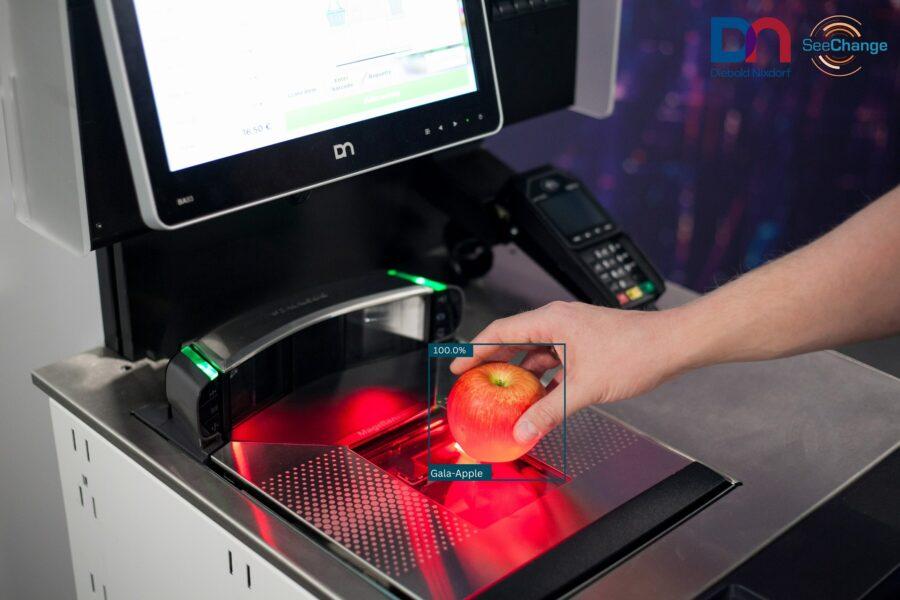
Computer vision helps improve both speed and transaction accuracy by recognizing products and identifying unusual checkout activity.
Common applications include:
→ Product recognition
→ Skip-scan detection
→ Checkout verification
→ Faster customer throughput
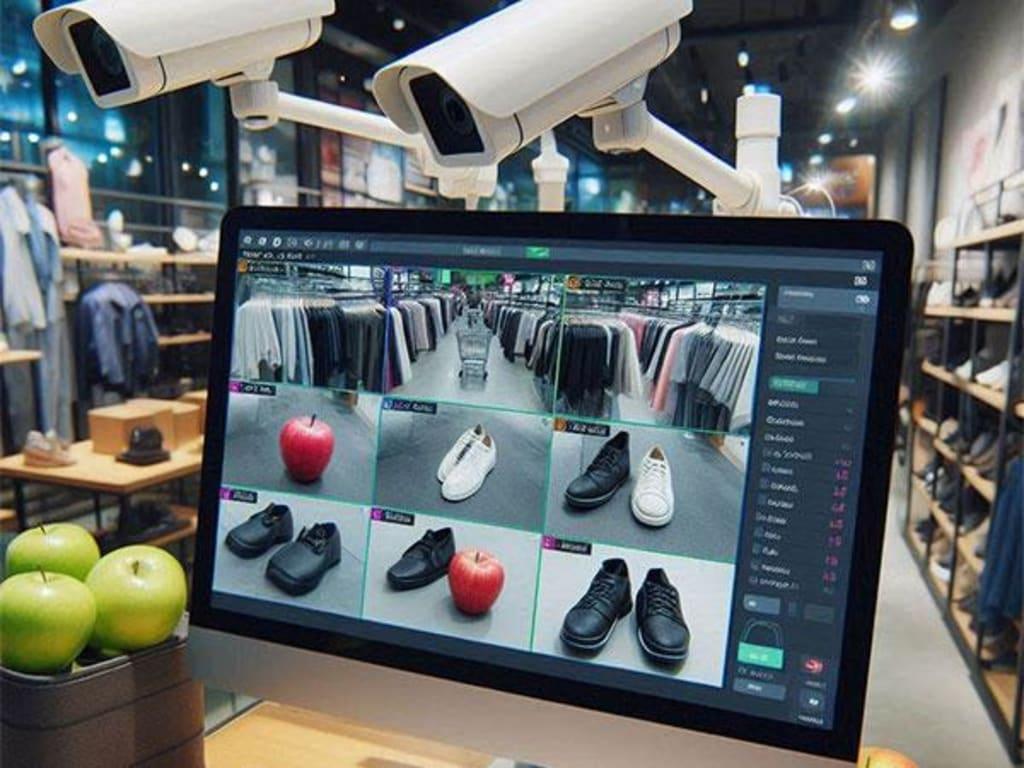
Computer vision helps identify operational anomalies as they happen.
Examples include:
→ Restricted area monitoring
→ Suspicious behavior detection
→ Inventory movement tracking
→ Exit monitoring
It uses anomaly detection models trained on real behavioral data, such as loitering near high-value merchandise, repeated shelf interaction without purchase, item concealment patterns, self-checkout scan manipulation, and cashier “sweethearting.”
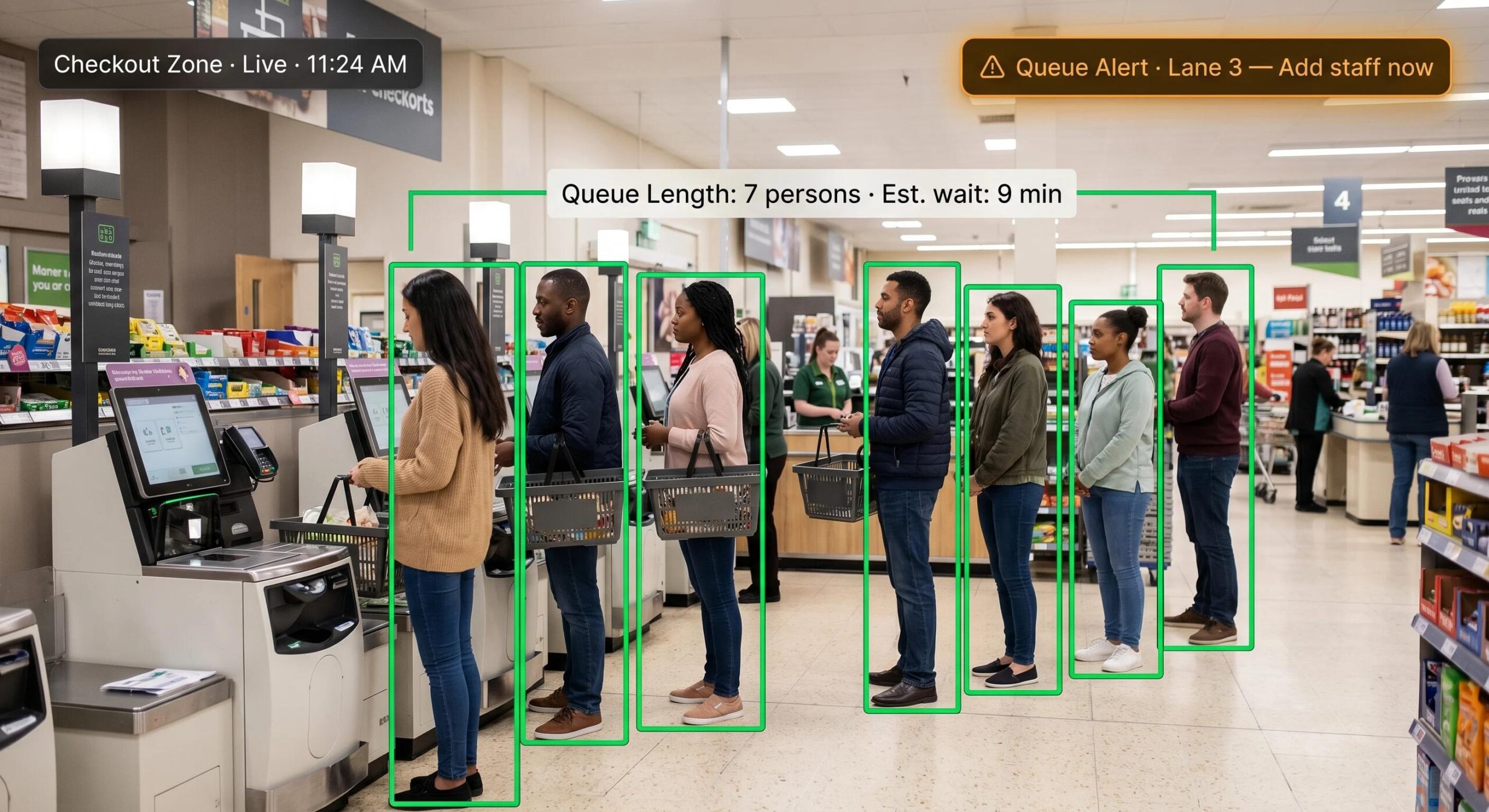
Customer experience often depends on checkout wait times.
Computer vision measures queue length in real time and supports dynamic staffing decisions.
Benefits include:
→ Faster lane opening
→ Reduced waiting time
→ Better labor allocation
→ Improved customer satisfaction
Stores generate valuable insights through customer movement patterns.
Computer vision helps retailers understand high-traffic areas, dwell time, product interaction, and store layout performance.
These insights support merchandising, promotions, and store design decisions.
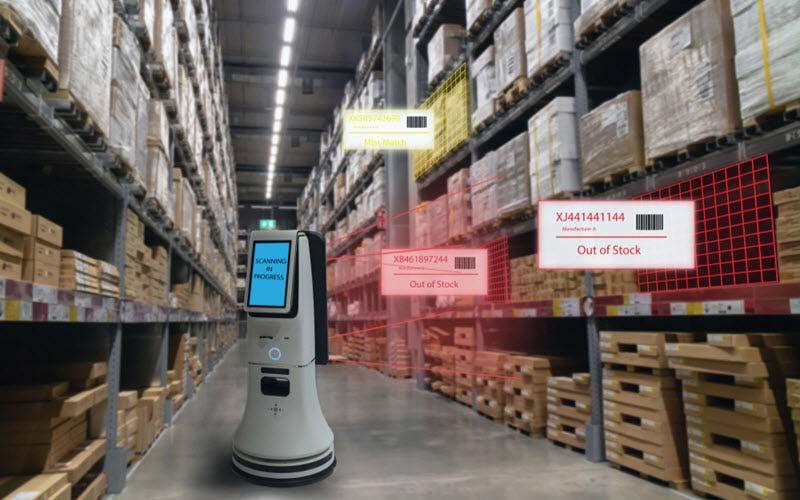
Warehouse automation often becomes a natural extension of store-based deployments.
Computer vision for retails can also improve:
→ Inventory counting
→ Package verification
→ Damage detection
→ Loading validation
→ Fulfillment accuracy

A retail computer vision system follows a structured workflow that connects cameras, AI models, and business applications.
Existing security or IP cameras continuously capture video from checkout counters, aisles, shelves, entrances, and backrooms.
Instead of sending every video stream to the cloud, edge devices analyze footage locally for faster response times and lower bandwidth consumption.
AI models detect products, empty shelves, shopping carts, customer movement, checkout activity, employee actions, inventory changes, etc.
However, different use cases rely on different computer vision techniques.
| Identifies products, shopping carts, customers, and shelves for inventory tracking, shelf monitoring, and checkout automation. | |
| Categorizes products, packaging, and store conditions to support inventory verification and quality control. | |
| Recognizes individual SKUs during self-checkout, shelf audits, and automated inventory management. | |
| Reads price labels, shelf tags, receipts, and promotional signage to verify pricing accuracy and planogram compliance. | |
| Separates products from shelves to measure facings, detect empty spaces, and analyze shelf utilization. | |
| Identifies individual products even when multiple similar items appear close together, improving inventory counting accuracy. | |
| Analyzes customer and employee movement to optimize store layouts, staffing decisions, and customer service. | |
| Follows customer movement, shopping carts, and product interactions across multiple camera frames for journey analytics. | |
| Detects unusual activities such as suspicious behavior, unexpected inventory movement, or restricted-area access. | |
| Measures product dimensions, estimates shelf occupancy, and supports autonomous retail systems with greater spatial accuracy. |
Once AI identifies an event, predefined workflows can automatically notify store associates, update dashboards, or integrate with operational systems.
Examples include:
→ Restock alerts
→ Queue notifications
→ Inventory updates
→ Security events
Instead of reviewing hours of video, managers receive actionable information through dashboards that highlight operational priorities.
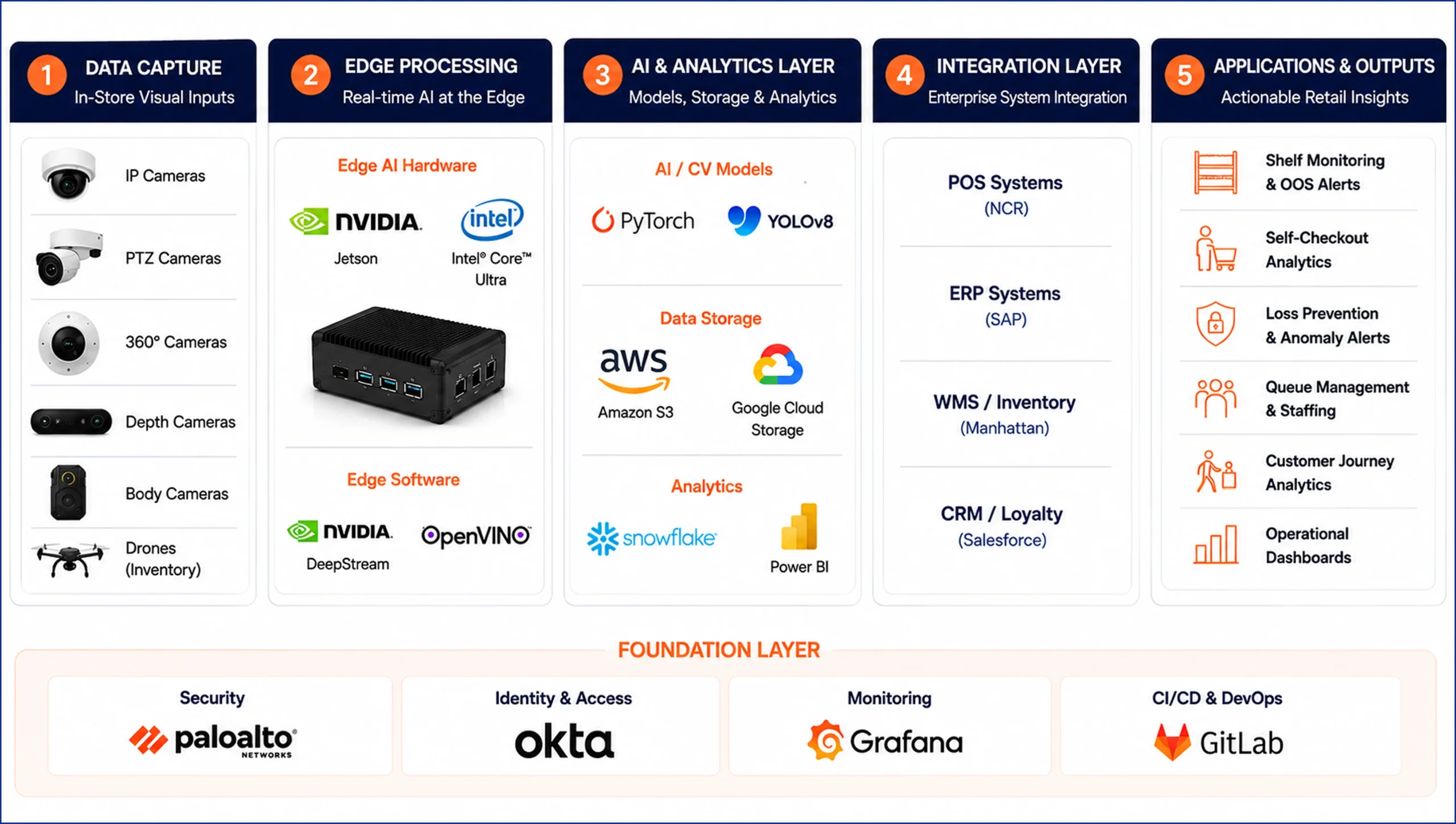
A production-ready retail computer vision system works as a connected pipeline that transforms camera feeds into operational actions.
Video captured through existing IP, PTZ, 360°, or depth cameras is processed on edge devices using tools like NVIDIA Jetson, DeepStream, and OpenVINO for low-latency inference.
AI models built with PyTorch and YOLOv8 analyze products, shelves, customers, and store activity, while cloud platforms such as AWS S3 and Google Cloud Storage store and manage visual data.
The insights then integrate with enterprise systems like NCR POS, SAP ERP, Manhattan WMS, and Salesforce CRM, enabling automated shelf monitoring, self-checkout analytics, loss prevention, queue management, customer journey analysis, and operational dashboards – all supported by a foundation of security, identity management, monitoring, and DevOps.
Pick a specific, measurable problem: self-checkout shrink at your 10 highest-loss locations. OOS rates in your beverage category. Planogram compliance across franchise locations.
Tight scoping separates successful pilots from expensive proof-of-concepts.
What cameras do you have? What resolution and placement? What network bandwidth per store? Do you have labeled training data or will you need to build a dataset?
These questions define your baseline investment and timeline before a single model is trained.
Choose 3–5 stores with varied conditions – different formats, traffic levels, lighting environments.
Define success metrics before you start. Set a minimum 8–12 week pilot window for meaningful signal. Include store operations staff from day one, not as observers but as active participants.
Off-the-shelf models rarely perform adequately without domain adaptation.
Plan for fine-tuning on footage from your actual stores, your actual product catalog, and your real-world environmental conditions. This step is where most pilots stall when skipped.
Design the data pipeline from CV output → alert/action → existing workflow before you optimize the model.
A perfect model that outputs into a dashboard nobody checks has zero business value. Integration earns the trust that makes the system operationally real.
Monitor model accuracy in production, not just in testing. Establish automated drift detection and retraining triggers. Version your models with the same discipline you apply to production software.
Once pilot performance is validated, document everything: hardware specifications, camera placement standards, integration configurations, onboarding materials, alert threshold settings.
This becomes your franchise model for scaling across the store network without rebuilding from scratch at each location.
Any implementation partner who glosses over these deserves immediate skepticism.
A model hitting 95% accuracy in a demo drops to 70–80% in a real store with inconsistent lighting, crowded shelves, and peak-hour motion blur.
Plan for domain adaptation – fine-tuning on actual store footage – as a non-negotiable step, not an optional upgrade.
Without it, pilots fail not because the technology is wrong but because the model wasn’t built for your specific environment.
This is the most underestimated risk in retail CV deployments. Illinois’ BIPA (Biometric Information Privacy Act) covers any biometric identifier – including facial geometry captured by in-store cameras.
While Illinois amended BIPA in August 2024 to limit per-scan damages and clarify electronic consent, potential damages remain high for noncompliant companies, and the statute may apply even to unknowing or unintentional violations.
Anonymized silhouette-based tracking and behavior analysis that processes visually but stores no biometric data.
Legal review before deployment, not after, is non-negotiable.
Camera upgrades, edge hardware, and network improvements can be material costs – particularly for multi-location deployments.
A single-store pilot using existing cameras is a low-cost entry point. Multi-location rollout requires genuine capital planning.
Connecting CV outputs to legacy POS, ERP, and workforce systems is frequently the hardest technical problem in the entire stack – not the vision models.
Older systems may not have APIs capable of receiving real-time event streams. Budget for middleware and integration engineering as a primary cost line.
Models trained on your product catalog will drift as packaging changes, seasonal products rotate, and store layouts evolve.
The entering focus at NRF 2026 was not AI adoption itself but AI adoption against high-priority use cases that create meaningful value – and that means tracking whether deployed models are still performing in production.
Without MLOps best practices – automated drift detection, retraining triggers, versioned model deployment – accuracy degrades silently until the system loses operator trust.
McKinsey’s retail AI research consistently shows that the failure mode is almost never the technology – it’s the absence of operational ownership, training, and accountability structures around what the system produces. A CV alert that nobody acts on has zero business value.

Computer vision in retail analyzes live camera feeds to automate tasks including shelf monitoring and OOS detection, self-checkout fraud prevention, footfall and dwell-time analytics, queue management, planogram compliance verification, and loss prevention. It converts passive camera infrastructure into a real-time operational intelligence layer – alerting staff, triggering workflows, and generating behavioral insights impossible to collect manually.
A structured single-use-case pilot (OOS detection or queue monitoring at 3–5 stores) typically ranges from $50,000–$150,000 depending on hardware requirements, model customization, and integration work. Enterprise multi-location programs are scoped as ongoing programs with monthly operational costs for model maintenance and MLOps. Partnering with an AI engineering firm generally has lower total cost than an internal build for the first 18–24 months. Retailers typically report ROI within 12–18 months of implementation.
Accuracy varies significantly based on training data quality, camera placement, lighting conditions, and retraining cadence. Well-deployed, domain-adapted systems achieve 90–95%+ accuracy on specific tasks. However, lab benchmarks should never be used as production estimates. Purpose-built retail vision platforms like Simbe’s, trained on over 60 billion shelf images across 18 million SKUs, achieve the kind of SKU-level accuracy that generic models cannot match. Domain adaptation using real store footage is a non-negotiable requirement.
Most deployments leverage existing IP or CCTV cameras (1080p minimum, 4K recommended for shelf-level work). Time-sensitive use cases additionally require edge inference hardware – NVIDIA Jetson AGX, Intel NUC, or similar edge AI platforms – with stable local network connectivity. Camera placement strategy matters as much as hardware: occlusion, viewing angle, and lighting will determine model performance more than camera specs alone.
Model degradation is normal and expected – packaging changes, new SKUs, seasonal displays, and store layout changes all cause drift. Prevention requires MLOps infrastructure built from day one: automated drift detection, defined retraining triggers, version-controlled model deployment, and production monitoring dashboards. Models should be treated with the same lifecycle discipline applied to production software. Without this, accuracy typically degrades silently over 6–12 months until the system loses operator trust – the most common reason live CV deployments fail in year two.
 19 mins

"*" indicates required fields

5432 Geary Blvd, Unit #527 San Francisco, CA 94121 United States
320 Decker Drive Irving, TX 75062 United States

6d-7398 Yonge St,1318 Thornhill, Ontario, Canada, L4J8J2

71-75 Shelton Street, Covent Garden, London, United Kingdom, WC2H 9JQ

Hohrainstrasse 16, 79787 Lauchringen, Germany

12, Zugerstrasse 32, 6341 Baar, Switzerland

5th floor, Bloukrans Building, Lynnwood Road, Pretoria, Gauteng, 0081, South Africa

12th & 13th Floor, B Square-1, Bopal – Ambli Road, Ahmedabad – 380054
B/305A, 3rd Floor, Kanakia Wallstreet, Andheri (East), Mumbai, India





 Talk to Our
Consultants
Talk to Our
Consultants Chat with
Our Experts
Chat with
Our Experts Write us
an Email
Write us
an Email