



Skip to content

How Does NVIDIA CUDA Development Accelerate Enterprise AI

Featured Image

AI applications need to process large amounts of data and perform complex calculations quickly. As models become more advanced, businesses need efficient ways to manage these workloads without increasing infrastructure costs unnecessarily.

NVIDIA CUDA helps developers use GPU processing power to accelerate computationally intensive tasks. It provides tools and libraries for optimizing AI workloads, improving processing speed, and supporting applications that require high performance.

At Azilen, we use NVIDIA technologies and GPU optimization techniques to help businesses develop efficient AI solutions. In this blog, we’ll explore how NVIDIA CUDA development supports enterprise AI, where it delivers value, and how businesses can address common challenges when building GPU-accelerated systems.

Why CUDA Development Matters for Enterprise AI?

AI models today demand massive parallelism. CPUs, even the best ones, are built for sequential execution, while GPUs excel at performing thousands of simultaneous computations.

CUDA, NVIDIA’s Compute Unified Device Architecture, gives developers the programming framework to harness this parallel power.

For enterprises, this means:

✔️ Faster model training and iteration cycles

✔️ Real-time inference at production scale

✔️ Greater hardware utilization and cost efficiency

✔️ Seamless integration across AI frameworks like PyTorch, TensorFlow, and Triton

CUDA doesn’t just accelerate workloads. It creates a foundation where AI becomes operationally viable and runs smoothly across cloud, on-premise, or hybrid environments.

How We Approach NVIDIA CUDA Development at Azilen?

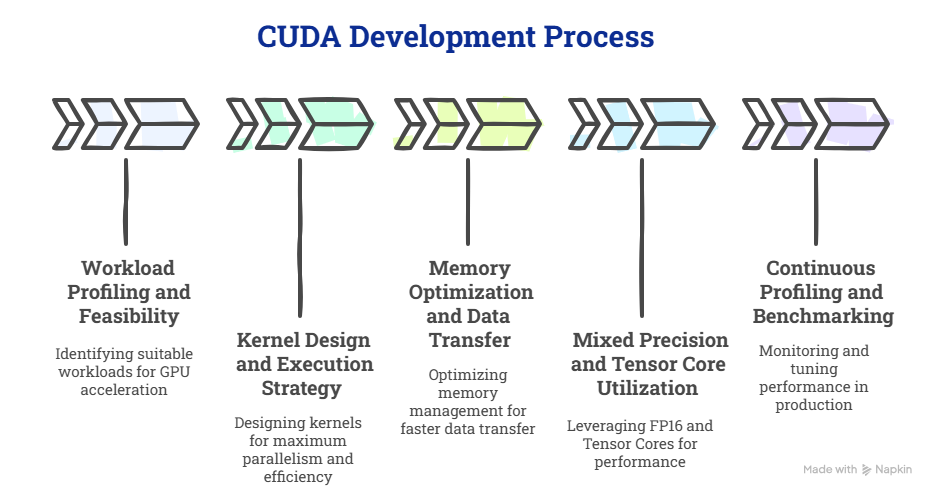
Building with CUDA involves structuring data, memory, and computation to fully exploit GPU parallelism. Our development approach typically follows this flow:

NVIDIA CUDA Development

1. Workload Profiling and Feasibility

We begin by identifying the right workloads for GPU acceleration.

Some operations, such as matrix multiplication, convolution, and feature extraction, show massive gains on CUDA cores. Others, like simple data I/O or light transformations, stay on the CPU.

Using tools like Nsight Systems and nvprof, we analyze kernel execution time, memory throughput, and bottlenecks. This helps us define the GPU-to-CPU ratio for each workload early in the design phase.

2. Kernel Design and Execution Strategy

Once the right workloads are identified, we move into kernel design.

We often start with CUDA C++ kernels tailored for the specific operation. For instance, a custom similarity score computation or a dense matrix operation optimized for coalesced memory access.

Each kernel is structured to maximize thread parallelism, minimize warp divergence, and fully utilize the SMs (Streaming Multiprocessors) of the GPU.

When we build AI models, this translates into:

✔️ Faster forward and backward propagation

✔️ Reduced training time for transformer or CNN-based architectures

✔️ High consistency in inference performance under concurrent loads

We also use CUDA streams to run multiple kernels concurrently, which ensures the GPU never sits idle.

3. Memory Optimization and Data Transfer

One of the most underrated aspects of NVIDIA CUDA development is memory management. Moving data between the host (CPU) and device (GPU) can be a performance killer if done inefficiently.

Our teams handle this by:

✔️ Allocating pinned (page-locked) memory to speed up host-device transfer

✔️ Using shared memory inside kernels for frequently accessed variables

✔️ Employing asynchronous memory copies to overlap computation with data movement

In high-frequency workloads such as fraud detection or image analytics, these micro-optimizations often lead to double-digit percentage gains in throughput.

4. Mixed Precision and Tensor Core Utilization

For deep learning workloads, we leverage FP16 (half precision) and Tensor Cores to maximize performance without compromising accuracy.

This approach, supported through NVIDIA’s cuDNN and TensorRT, allows us to speed up inference while lowering power and memory consumption.
Enterprises benefit from this directly – faster training loops, smaller infrastructure footprints, and more predictable deployment costs.

5. Continuous Profiling and Benchmarking

Once the system runs in a near-production setup, our engineers benchmark it using NVIDIA Nsight Compute, Triton Metrics, and Prometheus GPU exporters.

We track utilization efficiency, kernel occupancy, memory bandwidth, and latency per inference batch. This helps our AI Ops team continuously tune performance even after deployment.

CUDA Inside Azilen’s AI Stack

CUDA is deeply woven into Azilen’s AI engineering framework. It accelerates everything from model development to production-scale inference.

We apply CUDA across four main layers of the AI lifecycle:

1. Generative and Agentic AI Systems

For LLMs and agentic architectures, CUDA drives the fine-tuning, contextual reasoning, and continuous learning loops.

We use TensorRT and cuDNN to optimize transformer inference and orchestrate multi-agent reasoning across GPUs with high concurrency. This allows our agentic systems to think, plan, and respond with near-human latency, whether it’s an enterprise chatbot, knowledge agent, or workflow automation layer.

2. Deep Learning and Machine Learning Acceleration

In almost every deep learning pipeline, from CNNs to reinforcement models, we use CUDA-based libraries such as cuBLAS, cuSPARSE, and Thrust for matrix operations, gradient computations, and backpropagation efficiency.

These optimizations shorten model training cycles and make iterative tuning faster, which helps enterprises reach production readiness quickly.

3. Computer Vision and Edge Intelligence

For vision-based systems, CUDA enables models to perform real-time image recognition, defect detection, or spatial analytics directly on GPU or edge devices.

We integrate CUDA with OpenCV GPU modules, TensorRT, and NVIDIA DeepStream to process thousands of frames per second while maintaining high model precision.

4. Data Engineering and GPU-Accelerated Workflows

Efficient AI begins with data. Our teams use the RAPIDS ecosystem, built on CUDA, to accelerate ETL, feature extraction, and real-time data preparation.

By keeping data processing inside GPU memory, we reduce latency and ensure a seamless flow between training and inference environments.

5. MLOps and Cloud Orchestration

We extend CUDA performance into deployment using NVIDIA Triton Inference Server integrated with Kubernetes and Argo Workflows.

This setup helps us manage GPU resources dynamically across a hybrid cloud infrastructure, which balances load between inference requests and maintains predictable runtime performance.

Common Challenges in NVIDIA CUDA Development (and How Azilen Solves Them)

Many enterprises begin their CUDA development journey with enthusiasm but encounter hidden complexities when moving to production. Here are the challenges we often address in our projects:

1. Inefficient Kernel Design

Most performance bottlenecks begin at the kernel level. Custom kernels often run slower than expected because of poor memory access patterns, warp divergence, or excessive synchronization.

At Azilen, we use a profiling-first approach – analyzing occupancy, instruction throughput, and memory bandwidth before kernel optimization.

This lets our engineers refactor kernels for coalesced memory access and shared memory reuse to achieve consistent speedups.

2. Memory Management and Data Transfer Overheads

Moving data between CPU and GPU can silently consume up to half of the total runtime. Without pinned memory, asynchronous streams, or proper batching, even well-optimized models underperform.

Our approach incorporates overlapped computation and transfer through streams and events, which ensures the GPU remains continuously active. We also use unified memory for adaptive workloads that require dynamic allocation.

3. Lack of Scalability Across Multiple GPUs

Scaling from one GPU to many introduces complexities, such as device synchronization, data partitioning, and load balancing.

We build CUDA systems that integrate NCCL (NVIDIA Collective Communications Library) for multi-GPU communication, ensuring near-linear scaling for training and inference pipelines.

In hybrid setups, we orchestrate distributed execution using Kubernetes + Triton Inference Server to maintain GPU utilization across clusters.

4. Integration Gaps with Existing AI Infrastructure

Enterprises often have established MLOps and cloud stacks built around CPUs. Integrating GPU workloads without disrupting existing workflows can be challenging.

Our engineering teams bridge CUDA with enterprise pipelines using TensorRT, Triton, and MLflow integration layers. This enables organizations to deploy CUDA-accelerated AI without re-architecting their entire environment.

5. Limited Observability and Debugging Tools

When models scale, tracing GPU utilization or kernel-level performance issues becomes complex.

Azilen uses NVIDIA Nsight Systems and custom telemetry hooks to bring GPU-level visibility into Prometheus and Grafana dashboards.

This helps enterprise teams monitor GPU performance alongside application metrics, which closes the gap between development and operations.

6. Skill Gap and Maintenance Overhead

CUDA’s learning curve is steep, and maintaining custom kernels requires specialized skills.

We often support enterprises through a co-engineering model, where Azilen’s AI experts work alongside in-house teams to provide architectural guidance, performance benchmarking, and reusable code modules.

7. Vendor and Hardware Lock-In Concerns

Some enterprises hesitate to adopt CUDA deeply due to fears of being tied to specific GPU hardware or SDK versions.

We help mitigate that through modular architecture design by building abstraction layers that allow selective offloading to CUDA, ROCm, or even CPU fallback paths when needed. This future-proofs AI systems against rapid hardware evolution.

What’s the ROI of NVIDIA CUDA Development?

Performance in AI is no longer about raw speed; it’s about return on computation. CUDA brings measurable advantages:

✔️ Up to 20x faster model training compared to CPU-only systems

✔️ 40–60% reduction in inference latency for production workloads

✔️ Optimized hardware utilization, reducing total cloud GPU spend

These outcomes compound over time. Faster iterations mean faster innovation. Efficient GPU usage means better margins.

The result? Enterprises can bring AI products to market faster while keeping infrastructure costs under control.

Partner with Azilen for CUDA-Driven AI Acceleration

CUDA is an engineering discipline, and that’s exactly how we treat it at Azilen.

From fine-tuning kernels to optimizing distributed GPU workloads, our focus is to make your AI stack faster, smarter, and ready for real-world scale.

If your next AI project demands performance, parallelism, and production reliability, let’s design it with CUDA at the core.

Schedule a Consultation
with Azilen’s AI Engineering Team

Top FAQs on NVIDIA CUDA Development

1. Can NVIDIA CUDA accelerate an existing AI application?

Yes. Developers can use CUDA to optimize computationally intensive parts of an existing AI application without necessarily rebuilding the entire system. The potential improvement depends on the workload, current implementation, and available GPU hardware.

2. Is NVIDIA CUDA useful only for deep learning?

No. CUDA also supports scientific computing, data processing, image processing, simulations, and other workloads that benefit from parallel computing. Its usefulness depends on whether the tasks can be efficiently distributed across GPU cores.

3. What skills are required to develop custom CUDA applications?

Custom CUDA development commonly requires knowledge of C or C++, parallel programming, GPU architecture, memory management, and performance profiling. Experience with AI frameworks and GPU optimization tools is also valuable for AI-focused projects.

4. Can CUDA help reduce the cost of running AI applications?

Yes. CUDA optimization can reduce processing time and improve GPU utilization, potentially lowering the computing resources needed to handle a workload. However, actual cost savings depend on infrastructure pricing, workload characteristics, and optimization results.

5. When should a business choose custom CUDA development instead of standard AI libraries?

Custom CUDA development may be useful when standard libraries do not meet specific performance requirements or when a workload needs specialized GPU optimization. For common operations, existing libraries such as cuDNN and cuBLAS are often more practical because they already provide highly optimized implementations.

Glossary

1️⃣ CUDA (Compute Unified Device Architecture): A parallel computing platform and programming model developed by NVIDIA that enables developers to use GPUs for general-purpose processing.

2️⃣ GPU (Graphics Processing Unit): A specialized processor designed for parallel computation. GPUs handle multiple operations simultaneously, making them ideal for AI, deep learning, and data-intensive workloads.

3️⃣ Kernel: A function written in CUDA that runs on the GPU. It defines the operations each GPU thread performs in parallel.

4️⃣ Parallel Computing: A computational method where multiple processes run simultaneously to accelerate complex calculations.

5️⃣ cuDNN (CUDA Deep Neural Network Library): A GPU-accelerated library by NVIDIA that provides optimized primitives for deep neural networks such as convolution and pooling operations.

6️⃣ cuBLAS: A CUDA-based library implementing BLAS (Basic Linear Algebra Subprograms) operations for efficient matrix computations on GPUs.

google
Swapnil Sharma
Swapnil Sharma
VP - Strategic Consulting

Swapnil Sharma is the Vice President - Strategic Consulting at Azilen Technologies, with over 18 years of experience in consulting and presales. He helps organizations find the right AI opportunities and build clear digital roadmaps. He has led AI planning workshops with clients in HRTech, FinTech, and Retail, and has picked and ranked more than 15 AI use cases with a clear return on investment. He has also led work on Agentic AI and IoT use cases, and has set up methods to check whether a company is ready for AI. He has worked with clients across North America, Europe, and EMEA.

Related Insights