


Skip to content

How Does NVIDIA GPU Cloud Integration Speed Up AI Feature Delivery

Featured Image

AI-powered SaaS products are evolving quickly, with teams introducing features such as AI copilots, personalized recommendations, conversational analytics, and automated insights. But as these features grow, maintaining performance while releasing updates quickly becomes more challenging.

Slow inference, complex deployments, and inefficient GPU usage can delay product releases and affect the user experience. Teams need infrastructure that can support growing AI workloads without making development and operations more complicated.

NVIDIA GPU Cloud integration helps businesses build and deploy AI workloads using GPU-accelerated infrastructure, optimized software, and containerized AI tools. In this blog, we’ll explore how this integration supports faster AI feature delivery, improves resource utilization, and helps SaaS teams scale their AI products more efficiently.

Why AI-Native SaaS Teams Struggle with Velocity?

From our own experience designing and deploying AI systems, the biggest delays rarely come from the model itself. They surface in how the infrastructure handles it.

Teams typically face a few recurring challenges:

→ Inference lag once real users start hitting AI features at scale.

→ Unstable cost patterns as GPU resources remain underutilized or overprovisioned.

→ Slow retraining cycles that force longer release intervals.

→ Complex environment replication, especially across dev, staging, and production.

Traditional infrastructure wasn’t designed for these dynamic AI pipelines. Every new AI feature increases computational demands, while customer expectations for response time and reliability only rise.

Explore our >> AI Integration Services

How NVIDIA GPU Cloud Integration Accelerates Product Delivery?

NVIDIA’s GPU Cloud integration directly addresses recurring friction points with an infrastructure that accelerates training, streamlines inference, and keeps costs predictable.

Here’s what we’ve consistently observed after implementing it across different stacks and environments.

1. Model Deployment Becomes Instant

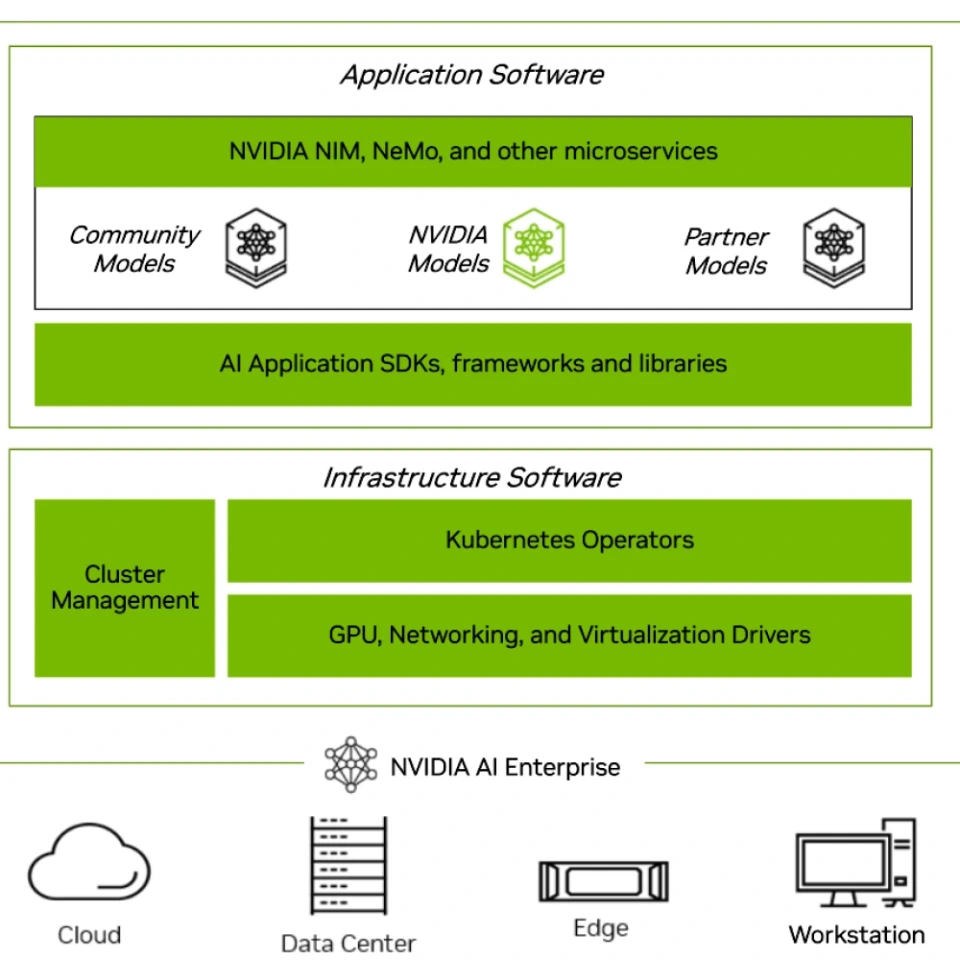
Provisioning new environments used to take hours or even days, especially when models needed GPU tuning. With NVIDIA AI Enterprise images, teams can spin up GPU-ready environments almost immediately.

NVIDIA AI Enterprise

Source: NVIDIA

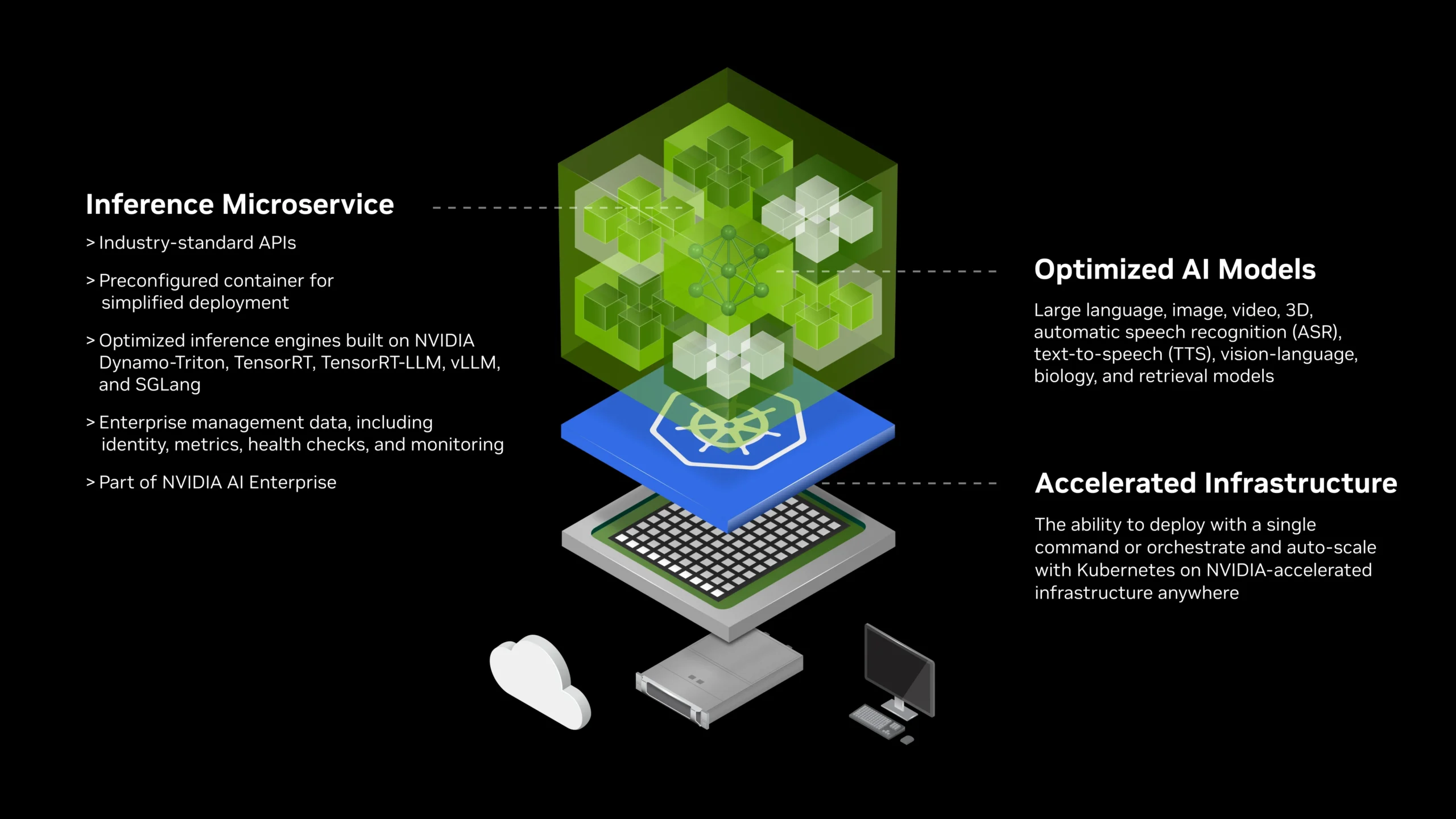
Using NIM microservices, model versions can be deployed as containerized endpoints, easily orchestrated via Kubernetes. We’ve noticed this drastically shortens deployment cycles and brings more consistency between dev and production environments.

NVIDIA NIM Microservices

Source: NVIDIA

2. Inference Speeds Up and Stays Consistent

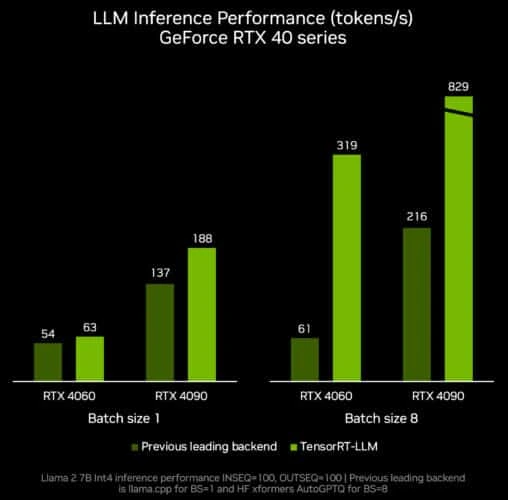
Low-latency inference has always been a defining factor for product experience. Through TensorRT-LLM and CUDA-X optimizations, NVIDIA’s stack consistently delivers faster throughput without code-level model refactoring.

TensorRT LLM Windows Inference Performance Chart

Source: NVIDIA

In one of our internal benchmarks, switching inference pipelines to GPU-optimized serving reduced response time by nearly two-thirds under concurrent load, all with the same model weights.

That’s the kind of improvement that changes the user experience entirely.

3. Retraining Without Downtime

Every product team wants to iterate faster, but retraining models often means interrupting live services.

With NVIDIA GPU Cloud integration, we’ve been able to maintain separate GPU pools for training and inference. This setup allows parallel retraining and live serving simultaneously.

Once the new model completes validation, it simply replaces the previous version via the microservice layer. No downtime, no rollback stress. The product team keeps shipping.

4. Cost Predictability Improves

GPU resources can be a double-edged sword, powerful yet expensive when idle. We’ve learned that Multi-Instance GPU (MIG) configurations and smart autoscaling policies make all the difference.

By splitting GPUs into smaller compute units and allocating them based on workload intensity, utilization rates rise significantly. Teams get predictable billing and no longer overpay for idle clusters.

This balance between speed and cost-efficiency is one of the most underrated benefits of proper integration.

Get Consultation
Accelerate AI Feature Delivery with NVIDIA GPU Cloud
Get expert guidance to optimize AI performance and scale your solutions.

How the SaaS Architecture Evolves with NVIDIA GPU Cloud Integration?

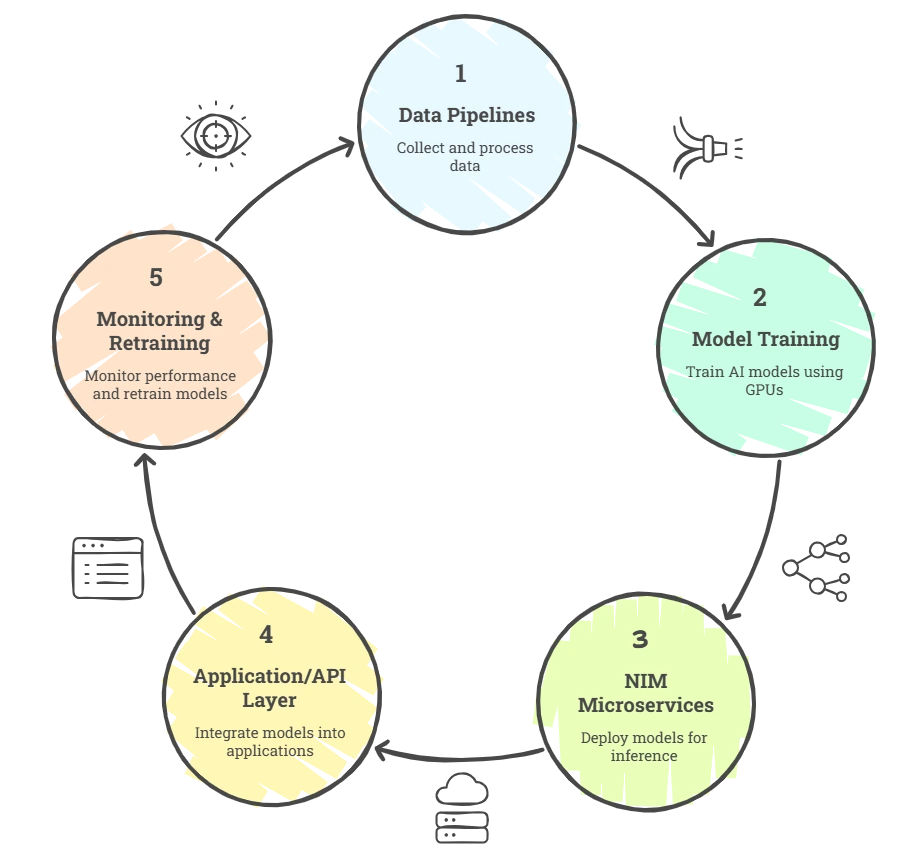
Over time, most SaaS teams we work with move toward a layered structure that looks like this:

Architecture Evolvement with NVIDIA GPU Cloud Integration

The goal is to keep every layer modular, observable, and GPU-aware.

We’ve seen that once this foundation is in place, scaling from a single AI feature to a full suite of intelligent product capabilities becomes seamless.

The Integration Approach That Works 

From our experience, the success of NVIDIA GPU Cloud integration depends less on tools and more on how the journey is structured.

Here’s how you can move step-by-step to reach stability faster and scale cleaner.

1. Assess Workload Behavior

We start by profiling latency, throughput, and concurrency patterns across models.

This analysis helps decide whether to use A100s, L40s, or H100s, and whether workloads belong on shared GPU nodes or dedicated clusters.

The goal here is to find the right fit between workload type and GPU configuration before touching deployment.

2. Design GPU-Aware Architecture

Once the performance profile is clear, we rearchitect the stack around GPU-native design.

This involves introducing NVIDIA AI Enterprise, CUDA-X, and NIM microservices as modular layers.
Kubernetes clusters are tuned for GPU scheduling using device plugins and optimized container runtimes.

Data pipelines feeding these models are restructured to ensure GPUs never sit idle waiting for I/O.

We’ve seen that designing this stage well creates the foundation for consistent model performance, no matter how many new features come in later.

3. Benchmark and Optimize Early

After initial integration, we benchmark every major component – model loading, inference latency, memory usage, and GPU occupancy.

Our engineering teams typically use Nsight Systems and NVIDIA Triton Inference Server metrics to identify optimization opportunities.

This early tuning often uncovers bottlenecks that aren’t visible in CPU-based simulations, such as suboptimal batch sizes or data transfer delays. Fixing them up front means fewer surprises once user traffic hits.

4. Automate Scaling and Retraining

The final stage turns the setup into a living, self-adjusting system.

Autoscaling rules are configured through Kubernetes Horizontal Pod Autoscaler (HPA) and NVIDIA GPU metrics, so clusters scale dynamically with traffic.

Separate GPU pools handle training and inference to prevent resource contention.

Retraining pipelines are automated using CI/CD triggers and MLOps workflows – every model update flows through versioning, validation, and GPU deployment automatically.

Why Choose Azilen for NVIDIA GPU Cloud Integration?

Getting NVIDIA GPU Cloud to perform at this level requires more than access to GPUs. It demands experience in tuning workloads, understanding orchestration behavior, and managing model lifecycle automation at scale.

Being an Enterprise AI Development company, our teams have navigated these complexities firsthand across varied AI workloads, multi-cloud environments, and real-time use cases.

That cumulative experience has shaped our playbook for NVIDIA GPU Cloud integration: an approach designed to enhance velocity, stability, and cost governance for AI-native products.

SaaS teams ready to accelerate their AI feature delivery can partner with Azilen’s GPU Cloud integration experts to design a future-ready, high-performance AI stack built on NVIDIA’s ecosystem.

Get Consultation
Ready to Accelerate Your AI Product Roadmap?
Partner with Azilen’s NVIDIA GPU Cloud integration team today.

Related Insights on Agentic AI

1. NVIDIA CUDA Development

Top FAQs on NVIDIA GPU Cloud Integration 

1. Is NVIDIA GPU Cloud suitable for SaaS startups?

Yes. SaaS startups can use NVIDIA GPU Cloud technologies to develop and deploy AI features without building every component from scratch. The right setup depends on their workloads, budget, and scalability needs.

2. Can NVIDIA GPU Cloud work with AWS, Azure, or Google Cloud?

Yes. NVIDIA AI technologies are available across major cloud platforms, although specific tools, GPU types, and deployment options vary by provider.

3. What factors affect the cost of NVIDIA GPU Cloud integration?

Costs depend on GPU selection, usage hours, model size, inference traffic, storage, and supporting infrastructure. Monitoring resource usage and scaling GPU capacity based on demand can help control spending.

4. Can NVIDIA GPU Cloud integration support AI product updates without downtime?

It can support deployment strategies such as rolling updates and blue-green deployments. With proper validation, traffic management, and rollback planning, teams can update AI models while minimizing service disruption.

5. How can a business determine whether it needs GPU cloud integration?

Businesses should evaluate model processing requirements, inference latency, expected user traffic, and current infrastructure costs. GPU cloud integration is worth exploring when AI workloads require more computing power or when existing infrastructure struggles to meet performance targets.

Glossary

NVIDIA GPU Cloud (NGC): A cloud-based platform by NVIDIA that provides GPU-optimized software, containers, and pre-trained models to accelerate AI development and deployment. It helps teams run AI workloads faster and more efficiently.

NVIDIA AI Enterprise: A suite of enterprise-grade AI tools, drivers, and frameworks optimized for GPUs. It ensures reliability, performance, and compatibility when deploying AI models in production environments.

NIM (NVIDIA Inference Microservices): Containerized microservices built by NVIDIA that simplify AI model deployment. They allow teams to serve, scale, and manage models just like regular microservices in Kubernetes.

TensorRT: A high-performance deep learning inference library from NVIDIA. It optimizes trained models to deliver faster predictions on GPU hardware without reducing accuracy.

CUDA: NVIDIA’s parallel computing platform and API that lets developers run computations on GPUs. It powers most of the speedups achieved through NVIDIA’s ecosystem.

google
Swapnil Sharma
Swapnil Sharma
VP - Strategic Consulting

Swapnil Sharma is the Vice President - Strategic Consulting at Azilen Technologies, with over 18 years of experience in consulting and presales. He helps organizations find the right AI opportunities and build clear digital roadmaps. He has led AI planning workshops with clients in HRTech, FinTech, and Retail, and has picked and ranked more than 15 AI use cases with a clear return on investment. He has also led work on Agentic AI and IoT use cases, and has set up methods to check whether a company is ready for AI. He has worked with clients across North America, Europe, and EMEA.

Related Insights