




 26 mins
Oct 12, 2026
An AI agent can make hundreds of tool calls, process long conversations, and repeat the same actions just to complete one task.
But what if your AI agent is spending more tokens than it actually needs? The problem may not be the task itself, but the unnecessary steps it takes to finish it.
That is where token optimization for AI agents comes in: helping agents work smarter, avoid runaway loops, and control costs without compromising results. In this guide, we explore why agent loops burn money, how to set safe limits, and how to make AI agents more efficient.
“The first rule of any technology used in a business is that automation applied to an efficient operation will magnify the efficiency.”
— Bill Gates
Token optimization for AI agents means using fewer tokens to complete a task without reducing the quality of the result. It helps control AI costs, especially when an agent needs multiple steps to finish a single task.
An AI agent works in a loop. It thinks, calls a tool, reads the result, and thinks again. According to the openai.github.io
, the agent continues this loop until it produces a final output.
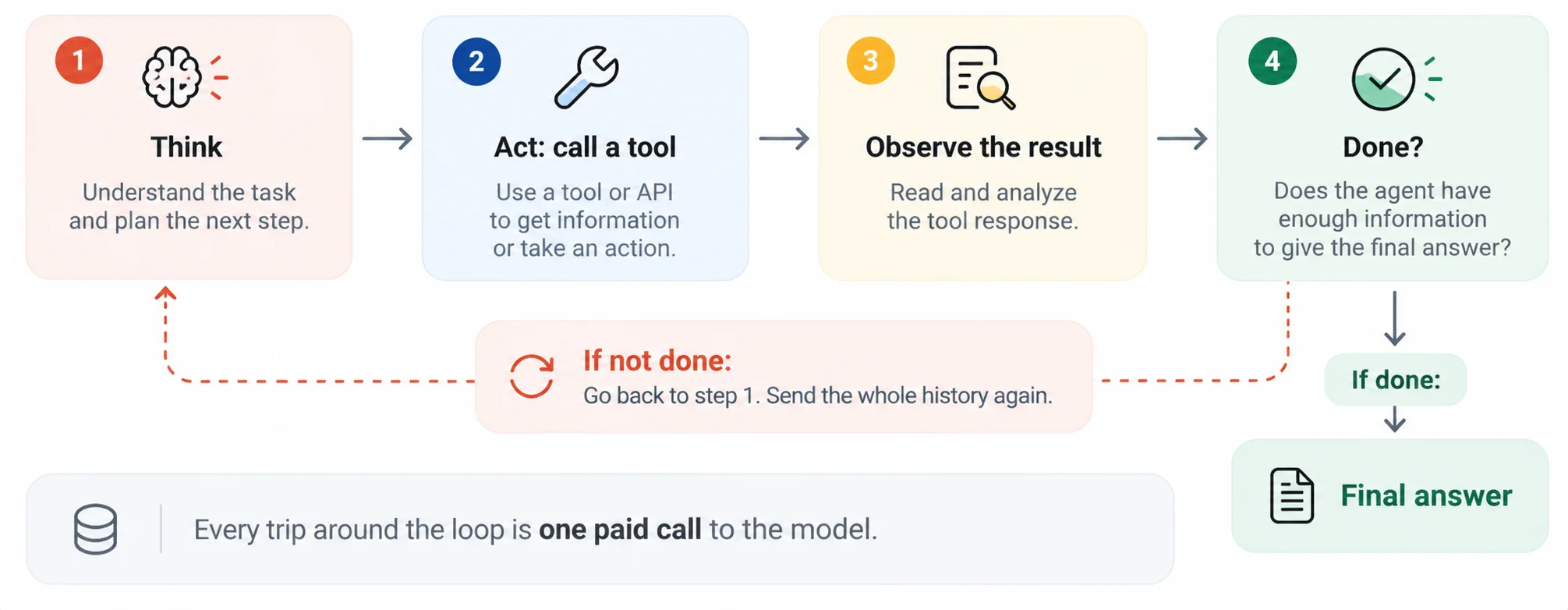
The problem? Every extra step can add to your AI agent token usage and agent loop costs. Understanding where these tokens go is the first step toward reducing unnecessary spending.
There are three main reasons why AI agents are expensive to run.
The difference can be significant. Some research reported that its multi-agent research system used about 4 times more tokens than a standard chat and nearly 15 times more for multi-agent systems. This shows why token optimization for AI agents matters as workflows become more complex.
AI agents can waste tokens when they repeat actions, get stuck in loops, or spend too much time checking their work. These problems increase AI agent token usage and agent loop costs. Here are six common issues to watch for.
| Failure | What Happens | How to Catch It |
|---|---|---|
| Retry Storm | A tool keeps failing, but the agent keeps trying again. | Count errors for each tool. |
| Tool Thrash | The agent repeats the same tool call with the same input. | Compare recent tool calls. |
| Ping-Pong | Two agents keep passing the task back and forth. | Limit the number of handoffs. |
| Goal Drift | The agent moves away from the original task. | Check progress against the goal. |
| Over-Checking | The agent keeps checking an answer that is already complete. | Limit verification steps. |
| Overthinking | The agent uses too many tokens to solve a simple task. | Set an output-token limit for each step. |
The key takeaway: Effective token optimization for AI agents starts with spotting wasted steps and setting clear limits before they drive up costs.
A runaway loop happens when an AI agent keeps repeating steps instead of finishing the task. Each extra step can increase AI agent token usage and agent loop costs.
Let’s look at an example. If one agent step costs $0.025, a normal task with 8 steps costs $0.20. But if a bug makes the agent run for 200 steps, the cost jumps to $5.00 – 25 times more.
If 100 tasks get stuck every day, that adds up to $500 per day, or $15,000 over 30 days. In real systems, costs can be even higher because each step may include the conversation history and previous tool results.
Steps if nothing stops it: 30
Loop gets stuck at step: 20
At Azilen, we help businesses control agent loop costs by setting clear limits on how long an AI agent can run, how many tokens it can use, and when it should stop. These circuit breakers help prevent runaway loops, reduce unnecessary AI agent token usage, and keep AI applications reliable.
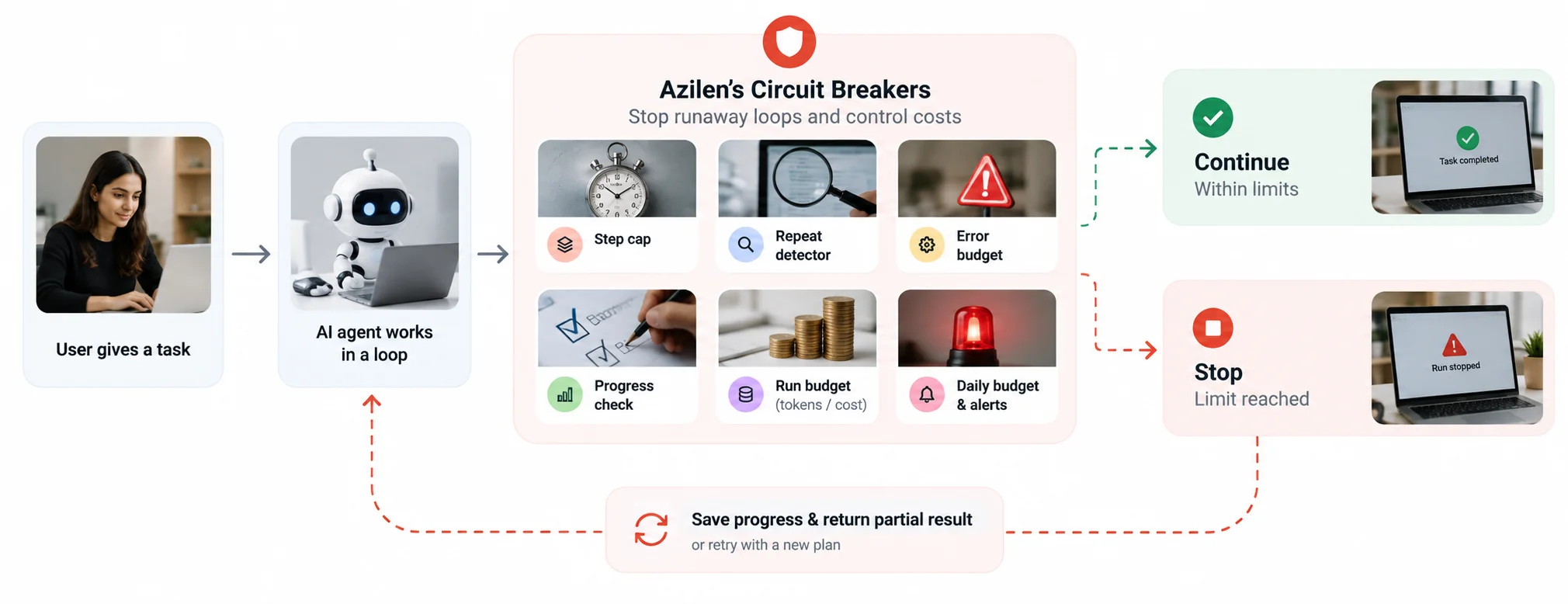
→ Limit agent steps: Set a maximum number of steps to prevent agents from running endlessly.
→ Detect repeated actions: Stop an agent when it keeps making the same tool call without progress.
→ Control errors: Stop repeated tool calls when a tool continues to fail.
→ Track progress: Check whether the agent is moving closer to its goal. If not, make it replan or stop.
→ Set usage budgets: Define token and cost limits for each run, user, or day.
→ Trigger alerts: Pause the agent when a limit is reached, save its progress, and return a partial result when possible.
These controls should be enforced in the application code, outside the agent’s own instructions. This makes token optimization for AI agents more reliable because the system can enforce limits even when the agent gets stuck.
Setting limits helps control token optimization for AI agents and prevents runaway loops from increasing AI costs. Follow these steps to set safe limits.
The cost of one AI agent run may look small, but not every run completes the task successfully. Failed runs still consume tokens and increase agentic AI costs.
The real measure is cost per successful task. It shows how much you spend to get a completed result.

| Success Rate | Cost per Run | Cost per Successful Task |
|---|---|---|
| 100% | $0.48 | $0.48 |
| 80% | $0.48 | $0.60 |
| 60% | $0.48 | $0.80 |
| 40% | $0.48 | $1.20 |
As the table shows, when the success rate drops, the cost of getting a successful result increases.
For example, improving the success rate from 60% to 80% reduces the cost per successful task from $0.80 to $0.60 – a 25% saving.
Every tool call adds another step to an AI agent’s workflow. Large tool responses and repeated calls increase AI agent token usage and agent loop costs. Better tool design helps agents work faster with fewer tokens.
→ Combine related actions: Combine tasks like listing, checking, and creating into one tool where possible. This reduces repeated calls and helps lower agent loop costs.
→ Search instead of listing: Return only relevant results instead of making the agent read every contact, file, or record. This reduces unnecessary input tokens.
→ Keep responses short: Return only the information the agent needs. Shorter tool responses use fewer tokens and leave more context space for the actual task.
→ Filter and limit results: Use filters, pagination, and output limits to prevent large tool responses from filling the context window with unnecessary information.
→ Give clear error messages: Explain what went wrong and how to fix it. Clear errors help agents recover without repeating failed actions and wasting tokens.

At Azilen, token optimization for AI agents is one of the five pillars of our APEX framework. We build cost controls into the development process from day one instead of treating them as a final check. Our approach focuses on three key practices.

Agents need loops. Loops need limits.
Our logo draws inspiration from orbits, where balance keeps a planet moving along its path. AI agents need a similar balance: the freedom to complete tasks and the limits to keep costs under control.
Guided by our ORBIT values of Openness and Trust, we make token usage and costs visible for every run, helping teams understand where their AI budgets go and where they can improve efficiency.
Tracking AI agent token usage helps you find wasted steps, control agentic AI costs, and prevent unexpected increases in spending. Monitor performance before release and throughout production.
| When | What to Do | What to Check |
|---|---|---|
| Before Release | Test the agent on real tasks. | Steps, tokens, tool errors, and run time. |
| At Release | Add cost checks to your build process. | Flag increases in average steps or tokens, such as 20%. |
| In Production | Track each agent run. | Retries, cost per successful task, and steps per run. |
| Every Day | Review a short usage report. | How many runs reach their limits. |
Monitoring AI agent token usage helps identify wasted steps, repeated tool calls, and unexpected cost increases. Track token usage, response time, tool errors, and the number of calls per task to find where your agent needs improvement.
Google Cloud’s agent observability guide explains how to monitor token usage, tool activity, latency, and errors. These metrics help you identify inefficient workflows and improve token optimization for AI agents.
Tracking AI agent token usage helps you find wasted steps, control agentic AI costs, and prevent unexpected increases in spending. Monitor performance before release and throughout production.
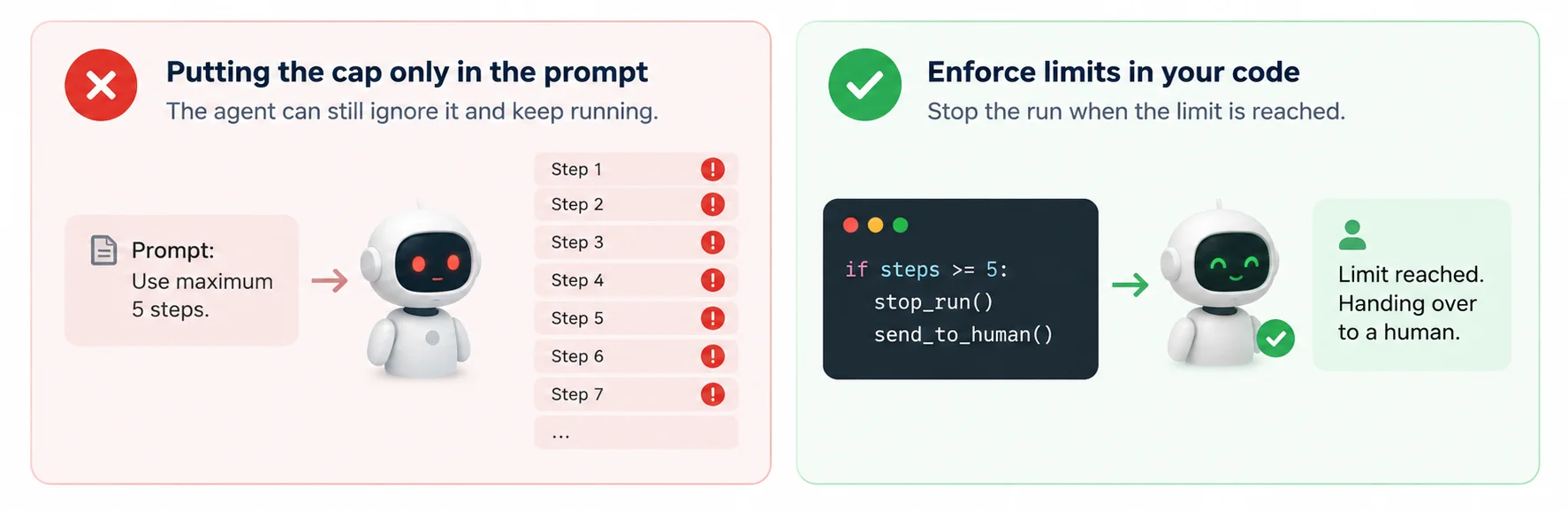
→ Relying only on prompts: Instructions can be ignored or fail. Enforce step limits, token budgets, and stop conditions in your application code.
→ Tracking only averages: A few runaway runs can hide behind good average results. Monitor the slowest 5% of runs to spot unusual costs and delays.
→ Counting calls instead of tasks: A low cost per model call does not guarantee an affordable workflow. Track the cost per successfully completed task.
→ Ignoring failed runs: Failed tasks still consume tokens and incur model and tool costs. Track failed runs to understand how much budget is being wasted.
→ Using the same limit for every agent: A simple lookup needs fewer steps than a complex research task. Set limits based on each agent’s purpose and normal usage.
→ Skipping human handoff: When an agent reaches its limit, save its progress and pass the task to a person instead of letting it continue unnecessarily.
Reduce unnecessary context, shorten tool responses, remove repeated information, and use just-in-time retrieval. Set token budgets and step limits to prevent wasted work while allowing agents enough resources to complete tasks accurately.
AI agents often need multiple model calls to complete one task. Each step may include conversation history, tool results, reasoning, and new instructions. Repeated calls, large tool responses, and long outputs can increase token usage and costs.
Set maximum step limits, detect repeated tool calls, track errors, and define clear stopping conditions. Enforce these controls in application code rather than relying only on prompts. When an agent reaches a limit, save its progress and trigger a retry or human handoff.
Divide the total cost of agent runs by the number of successfully completed tasks. For example, if 100 runs cost $48 and 80 tasks succeed, the cost per successful task is $0.60. This metric includes the cost of unsuccessful runs.
Test the agent on 50–100 representative tasks and record token usage, steps, and completion rates. Set limits slightly above normal usage to accommodate complex tasks. Review them regularly as models, prompts, tools, and workflows change.


 26 mins
 19 mins
 "*" indicates required fields

5432 Geary Blvd, Unit #527 San Francisco, CA 94121 United States
320 Decker Drive Irving, TX 75062 United States

6d-7398 Yonge St,1318 Thornhill, Ontario, Canada, L4J8J2

71-75 Shelton Street, Covent Garden, London, United Kingdom, WC2H 9JQ

Hohrainstrasse 16, 79787 Lauchringen, Germany

12, Zugerstrasse 32, 6341 Baar, Switzerland

5th floor, Bloukrans Building, Lynnwood Road, Pretoria, Gauteng, 0081, South Africa

12th & 13th Floor, B Square-1, Bopal – Ambli Road, Ahmedabad – 380054
B/305A, 3rd Floor, Kanakia Wallstreet, Andheri (East), Mumbai, India





 Talk to Our
Consultants
Talk to Our
Consultants Chat with
Our Experts
Chat with
Our Experts Write us
an Email
Write us
an Email