Skip to content

How to Integrate an AI Agent into an ASP.NET Core Application?

Featured Image

For ASP.NET Core applications, Microsoft now provides Agent Framework hosting libraries that allow agents and workflows to live alongside existing application infrastructure, with dependency injection handling the agent and its dependencies.

This guide explains how the pieces fit together and how to approach an AI agent integration for an existing ASP.NET Core application.

Understanding an AI Agent in an ASP.NET Core Application

An AI agent is an application component that can interpret a goal, decide what steps are required, use available tools, and produce an outcome.

A conventional AI feature might send a prompt to an LLM and return the generated response.

An agent can go further by:

→ Calling application APIs

→ Searching business data

→ Retrieving documents

→ Executing approved functions

→ Maintaining conversation state

→ Using multiple tools during one task

→ Returning results to the application

Microsoft’s current Agent Framework uses AI Agent as the fundamental abstraction for agents.

For example, instead of asking: “What is the status of order #12345?”

A customer could ask: “Check order #12345, tell me why it’s delayed, and create a support ticket if it won’t arrive this week.”

The agent could:

Understand request → retrieve order → check shipping data → determine status → create ticket → respond

That’s where an agent becomes useful inside an enterprise application.

How AI Agents Fit into an ASP.NET Core Architecture?

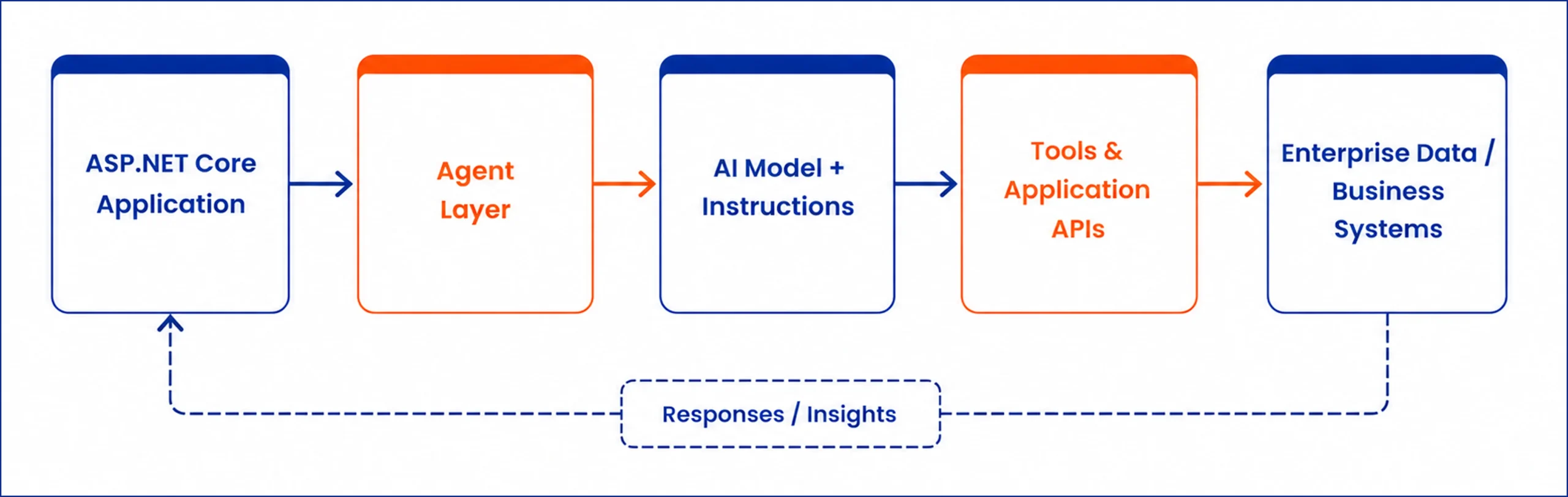
A typical architecture can look like this:

ASP .NET Core AI agent architecture with AI model APIs and data systems

The ASP.NET Core application remains responsible for the application’s core infrastructure, authentication, routing, business services, and other existing capabilities.

The agent becomes an additional intelligent layer that can interact with those capabilities through controlled tools and services.

Microsoft’s current hosting model allows Agent Framework agents to be registered through ASP.NET Core’s dependency injection system and hosted alongside the application infrastructure.

Which Microsoft Technologies You Can Use?

There are several pieces in Microsoft’s current .NET AI ecosystem, and they serve different purposes.

Microsoft.Extensions.AI

Microsoft.Extensions.AI provides common .NET abstractions such as IChatClient and IEmbeddingGenerator<TInput,TEmbedding>.

This gives applications a consistent way to interact with different AI services.

It’s useful when your application needs:

→ Chat

→ Text generation

→ Embeddings

→ Model interaction

→ AI middleware

→ Provider flexibility

Microsoft explicitly describes this layer as a common abstraction for AI services rather than an agent framework itself.

Microsoft Agent Framework

When your application needs goal-oriented, multi-step behavior, Microsoft Agent Framework provides the agent abstraction, tools, sessions, workflows, and hosting capabilities.

Microsoft’s current guidance positions Agent Framework for agentic applications and multi-step orchestration.

Microsoft Foundry

Microsoft Foundry Agent Service provides a managed environment for building, deploying, and scaling AI agents. It supports prompt agents and hosted agents, along with tools, identity, observability, versioning, and other enterprise capabilities.

So the choice can broadly look like:

.NET AI Technology Table
Requirement Microsoft Option
Model interaction Microsoft.Extensions.AI
AI abstractions Microsoft.Extensions.AI
Multi-step agents Microsoft Agent Framework
Managed agent runtime Microsoft Foundry Agent Service
Enterprise AI platform Microsoft Foundry
ASP.NET Core hosting Agent Framework hosting

11 Steps to Integrate an AI Agent into an ASP.NET Core

Follow a practical approach to integrate an AI agent with ASP.NET Core application, from defining its role to integrating models, tools, data, security, and production monitoring.

1. Define What the Agent Should Do

Good agent use cases have a clear goal and access to useful tools.

For example: Customer support agent

→ Find customer account

→ Retrieve order information

→ Check delivery status

→ Search support knowledge

→ Create support ticket

→ Escalate when required

This is more useful than simply adding a chatbot that answers questions.

2. Choose the Agent Architecture

Microsoft currently supports multiple ways to host agents.

You can host an Agent Framework application yourself inside an ASP.NET Core application, expose it through protocols such as A2A or AG-UI, or use Microsoft Foundry Agent Service as a managed runtime.

Self-hosted

Your ASP.NET Core application controls routing, identity, authorization, storage, deployment, scaling, and request policies.

Microsoft specifically recommends this pattern when the agent endpoint needs to integrate closely with existing application infrastructure.

Managed with Microsoft Foundry

Foundry Agent Service manages the agent runtime, conversations, tools, identity, observability, and scaling.

This can make sense when the organization wants a managed platform around its agents.

3. Connect the AI Model

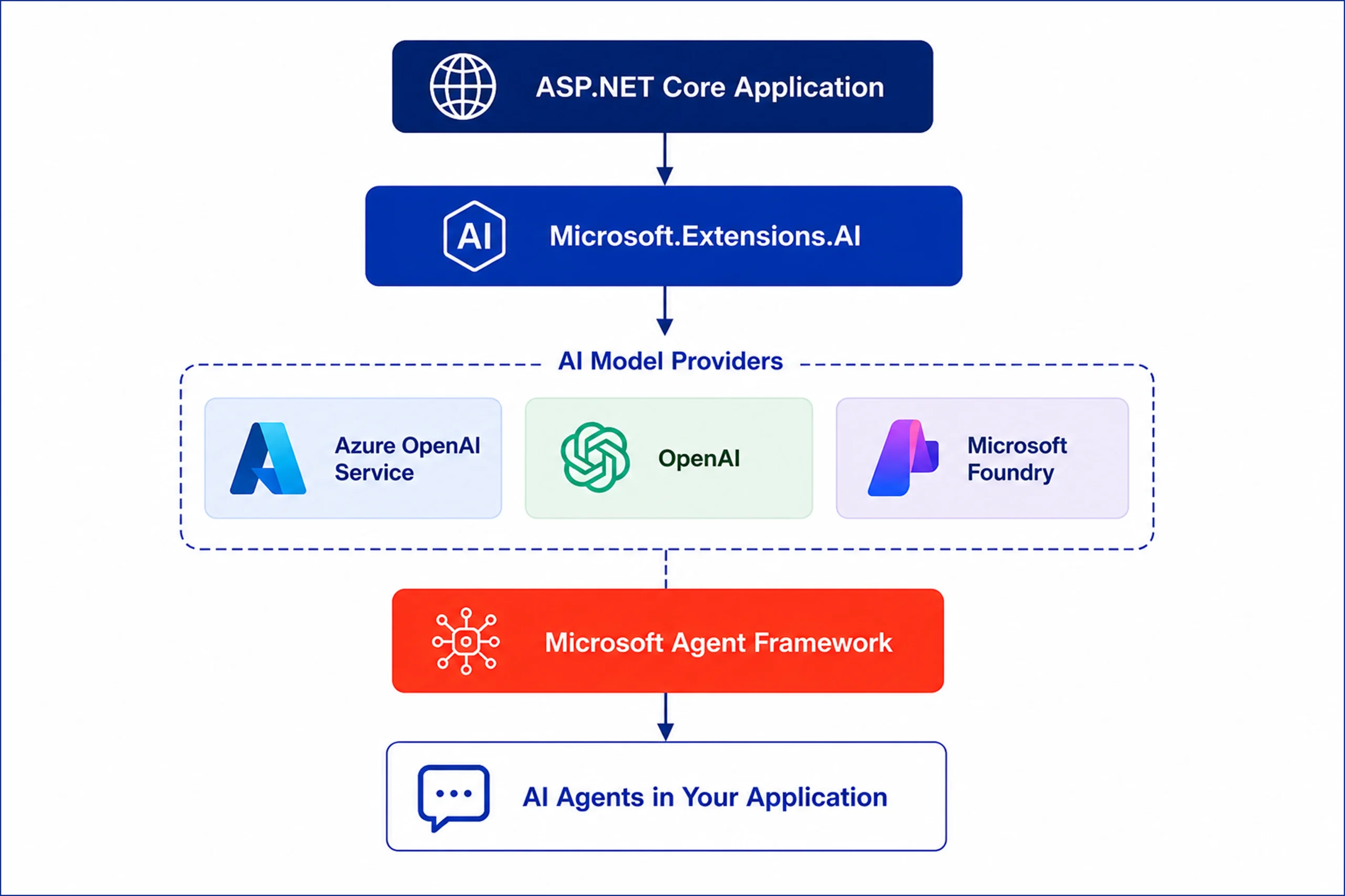
Microsoft’s current .NET AI ecosystem supports providers, including Azure OpenAI, Microsoft Foundry, OpenAI, Ollama, Google Gemini, and Amazon Bedrock.

Microsoft.Extensions.AI provides a common abstraction layer across supported providers.

Microsoft .NET AI stack for ASP.NET Core applications

For enterprise applications already operating on Azure, Microsoft Foundry and Azure OpenAI can be natural choices depending on the application’s requirements.

4. Give the Agent Instructions

Instructions define the agent’s role, goals, boundaries, and expected behavior.

The instruction layer should establish clear boundaries around what the agent can and cannot do.

For enterprise applications, those boundaries become particularly important when the agent can access customer records, financial information, internal documents, or business operations.

5. Give the Agent Tools

Tools are what allow an agent to interact with the application.

A tool might call:

→ An ASP.NET Core service

→ An internal API

→ A database

→ A search system

→ A document repository

Microsoft Foundry Agent Service currently supports built-in tools as well as custom tools and MCP servers.

This means your existing business capabilities can become controlled tools available to the agent.

6. Connect Enterprise Data

An agent becomes considerably more useful when it can work with the organization’s own information.

For knowledge-heavy use cases, retrieval-augmented generation can provide the agent with relevant information before generating a response.

For action-oriented use cases, tools and APIs allow the agent to interact with business systems.

The important architectural distinction is:

Knowledge → retrieval

Action → tools/API

That separation helps keep the system easier to control and maintain.

7. Add Authentication and Authorization

ASP.NET Core already provides authentication and authorization mechanisms that can be applied around application endpoints and services.

For agent integrations, access should be limited according to:

→ User identity

→ Roles

→ Permissions

→ Data access

→ Tool permissions

→ Business policies

Microsoft Foundry Agent Service includes Microsoft Entra identity, RBAC, content filters, and virtual network isolation as part of its enterprise capabilities.

8. Manage Conversation State

Agents often need context across multiple interactions.

Microsoft’s current agent model supports sessions, which allows an agent to maintain context between turns. The Foundry platform also uses conversations to persist interaction history.

For example:

User: Check my latest order.

Agent: Your order is scheduled for Friday.

User: Can you change the delivery address?

The second request depends on information from the first interaction and may also require an authorization check before the agent performs an action.

9. Expose the Agent Through ASP.NET Core

Microsoft Agent Framework provides hosting libraries specifically for ASP.NET Core.

The hosting layer handles registration and configuration of agents and workflows through the application’s dependency injection infrastructure.

Depending on the application, agents can be exposed through:

→ ASP.NET Core endpoints

→ OpenAI-compatible endpoints

→ A2A

→ AG-UI

Microsoft’s current hosting documentation lists these as supported hosting approaches.

For web-based agent experiences, AG-UI can stream agent events to the client using server-sent events.

10. Test Before Production

An agent can produce different results depending on the prompt, model, tools, retrieved information, and user input.

Testing should therefore cover more than whether an API returns a successful response.

Evaluate:

→ Answer quality

→ Tool selection

→ Tool parameters

→ Retrieval accuracy

→ Unauthorized actions

→ Incorrect assumptions

→ Failure handling

→ Response latency

→ Cost

→ Security

→ Regression across model changes

Microsoft’s current .NET AI ecosystem includes evaluation libraries for assessing AI feature quality and regression behavior.

11. Monitor the Agent in Production

Production monitoring should help your team understand:

→ What the user asked

→ Which tools the agent called

→ Which model was used

→ How long the request took

→ What errors occurred

→ How much the request cost

→ Whether the agent achieved the intended outcome

Microsoft Foundry Agent Service currently provides tracing, metrics, evaluations, and Application Insights integration for agent observability.

Capabilities You Can Add with AI Agents in ASP.NET Core

AI agents can extend an ASP.NET Core application beyond generating responses.

By connecting models with APIs, business logic, enterprise data, and approved tools, you can add intelligent capabilities directly into existing application workflows.

Tool Calling & API Actions

Let AI agents interact with application services and APIs to retrieve information or perform approved actions based on a user’s request.

RAG & Enterprise Knowledge Search

Connect agents to internal documents, databases, and knowledge bases so users can ask questions and receive responses grounded in your organization’s information.

Multi-Step Workflow Automation

Allow agents to handle tasks that require several steps, such as collecting information, calling multiple services, checking conditions, and completing an approved workflow.

AI-Powered Decision Support

Use AI agents to analyze relevant information, identify patterns, summarize findings, and provide recommendations while keeping business rules and human oversight in place.

Conversational Application Experiences

Add natural-language interfaces to existing ASP.NET Core applications so users can find information, navigate workflows, and interact with application features through conversation.

Human Approval & Controlled Actions

Require human confirmation before an agent performs sensitive operations such as changing records, submitting requests, approving transactions, or triggering business processes.

Multi-Agent Workflows

Use multiple specialized agents when a task involves different areas of expertise, with each agent handling a defined responsibility within a larger workflow.

Personalized User Experiences

Combine user context, permissions, application data, and conversation history to provide responses and actions that are relevant to each user’s role and needs.

How Azilen Can Help Integrate AI Agents into .NET Applications?

Azilen is an enterprise AI development company.

With 17+ years of software engineering experience, our teams bring the technical depth needed to integrate AI agents into existing applications and build new AI-enabled .NET solutions.

How we help:

✔️ Assess your existing .NET application and identify suitable AI agent opportunities

✔️ Design the agent architecture, tools, APIs, and data flow

✔️ Integrate AI models, RAG, enterprise data, and business systems

✔️ Build secure agent workflows with appropriate access controls

✔️ Connect agents with existing ASP.NET Core services and APIs

✔️ Test, evaluate, deploy, and monitor AI agents in production

17+ years of engineering experience, 100+ enterprise products delivered, and expertise across .NET, AI, cloud, APIs, and enterprise systems give Azilen the depth to work across both sides of the integration – the existing application and the new AI layer.

Our teams understand how to introduce AI into established technology environments while keeping architecture, security, performance, and business requirements in focus.

Talk to our experts about your application, use case, and the right approach for integrating an AI agent.

FAQs

How much does it cost to integrate an AI agent into an ASP.NET Core application?

The cost depends on the agent’s complexity, AI model, number of tools, APIs, data sources, security requirements, and deployment environment. A simple agent connected to a few APIs requires less development than a multi-step enterprise agent working across several systems. Ongoing costs can also include model usage, cloud infrastructure, monitoring, and maintenance. A technical assessment can provide a more accurate project estimate.

How long does it take to integrate an AI agent into an ASP.NET Core application?

The timeline depends on the application’s existing architecture, the agent’s capabilities, integrations, data requirements, and testing needs. A focused AI agent connected to existing APIs can be developed faster than an enterprise agent requiring multiple systems and complex workflows. Planning, security, evaluation, and production deployment should also be included in the timeline. The final estimate depends on the specific use case.

Is an AI agent secure for enterprise ASP.NET Core applications?

An AI agent can be designed with enterprise security controls around identity, authorization, data access, tool permissions, and application endpoints. Sensitive actions can require human approval before execution. Microsoft technologies such as Microsoft Entra ID, role-based access control, content filtering, and network isolation can also support enterprise AI deployments. Security requirements should be defined as part of the agent architecture.

Can an AI agent access databases in an ASP.NET Core application?

Yes, but database access should be controlled through appropriate application services, APIs, or purpose-built tools rather than giving the agent unrestricted database access. This allows developers to control which information the agent can retrieve or modify. Permissions, validation, logging, and business rules should remain part of the application layer.

Can an AI agent perform actions, or does it only generate responses?

An AI agent can do both. When connected to approved tools and APIs, it can retrieve information and perform defined actions within an application. Actions can include creating records, updating information, searching systems, generating documents, or triggering workflows. Sensitive operations can be protected with authorization checks and human approval.

author avatar
Swapnil Sharma Vice President – Strategic Consulting
Swapnil Sharma is VP – Strategic Consulting at Azilen Technologies with expertise in digital transformation, presales, and business strategy. He has led 750+ RFPs and helps organizations drive technology-led growth through consultative solutions.
google
Swapnil Sharma
Swapnil Sharma
VP - Strategic Consulting

Swapnil Sharma is a strategic technology consultant with expertise in digital transformation, presales, and business strategy. As Vice President - Strategic Consulting at Azilen Technologies, he has led 750+ proposals and RFPs for Fortune 500 and SME companies, driving technology-led business growth. With deep cross-industry and global experience, he specializes in solution visioning, customer success, and consultative digital strategy.

Related Insights

GPT Mode
AziGPT - Azilen’s
Custom GPT Assistant.
Instant Answers. Smart Summaries.