



Skip to content

Semantic Caching for LLMs: How Much It Saves and Where It Goes Wrong

Featured Image

Executive Summary

Semantic caching for LLMs helps reduce repeated AI requests by reusing answers when new questions have a similar meaning. This guide explains how semantic caching works, how much it can save, and where it can go wrong.

→ Understand semantic caching: Learn how embeddings, similarity scores, and cache hits help reuse previous LLM responses.

→ Reduce LLM costs: Use semantic caching to reduce unnecessary API calls, token usage, and response latency.

→ Cache safely: Set the right similarity threshold, use suitable TTLs, and avoid caching personal or time-sensitive information.

Your LLM may be answering the same question twice, just in different words. And every repeated answer can mean another API call, more tokens, and a bigger bill.

What if your AI could recognise the meaning, reuse the answer, and skip the work? That’s where semantic caching comes in.

“The first rule of any technology used in a business is that automation applied to an efficient operation will magnify the efficiency.”

— Bill Gates

What Is Semantic Caching?

Semantic caching is a way to save an LLM’s previous answers and reuse them when a new question has the same meaning.

Normally, every time someone asks an LLM a question, the system sends that question to the model, waits for a response, and uses computing resources to generate the answer. If another person asks almost the same question in different words, the LLM may generate the answer again.

Semantic caching avoids this repeated work.

Instead of checking whether the exact words are the same, it checks whether the meaning of the new question is similar enough to a question that has already been answered.

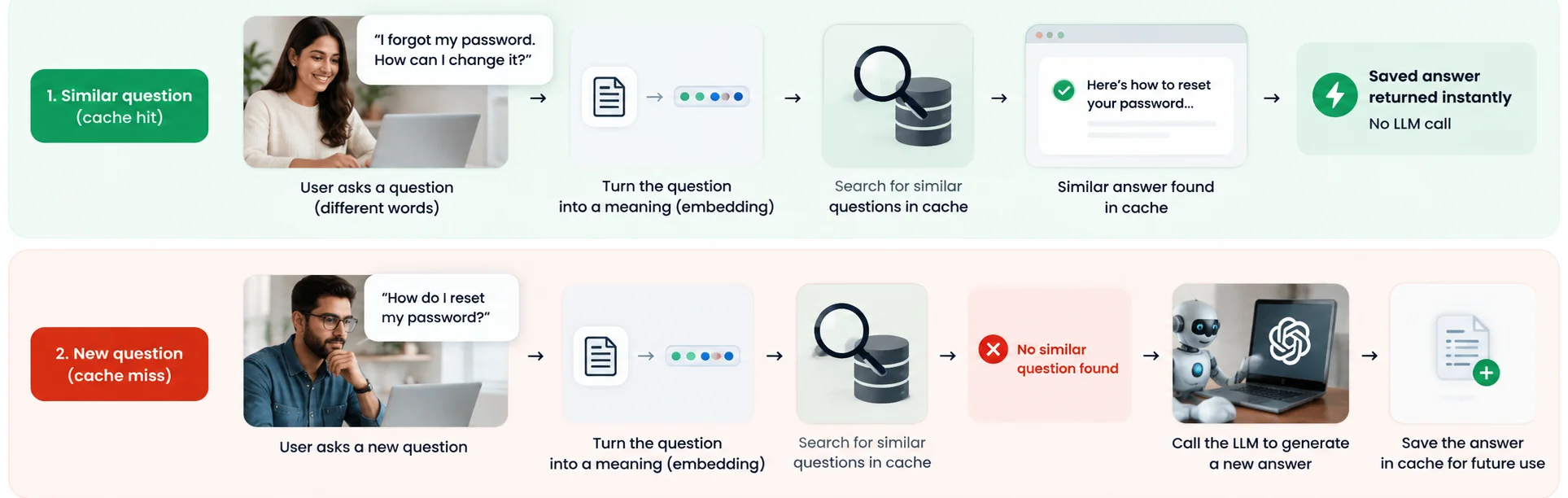
What Is Semantic Caching

Imagine someone asks:

“How do I reset my password?”

The LLM answers and the system saves that answer.

Later, another person asks:

“I forgot my password. How can I change it?”

The words are different, but the meaning is almost the same.

Semantic caching can recognise this similarity and return the previously saved answer instead of sending the question to the LLM again.

What Is an Embedding, and Why Does Semantic Caching Need It?

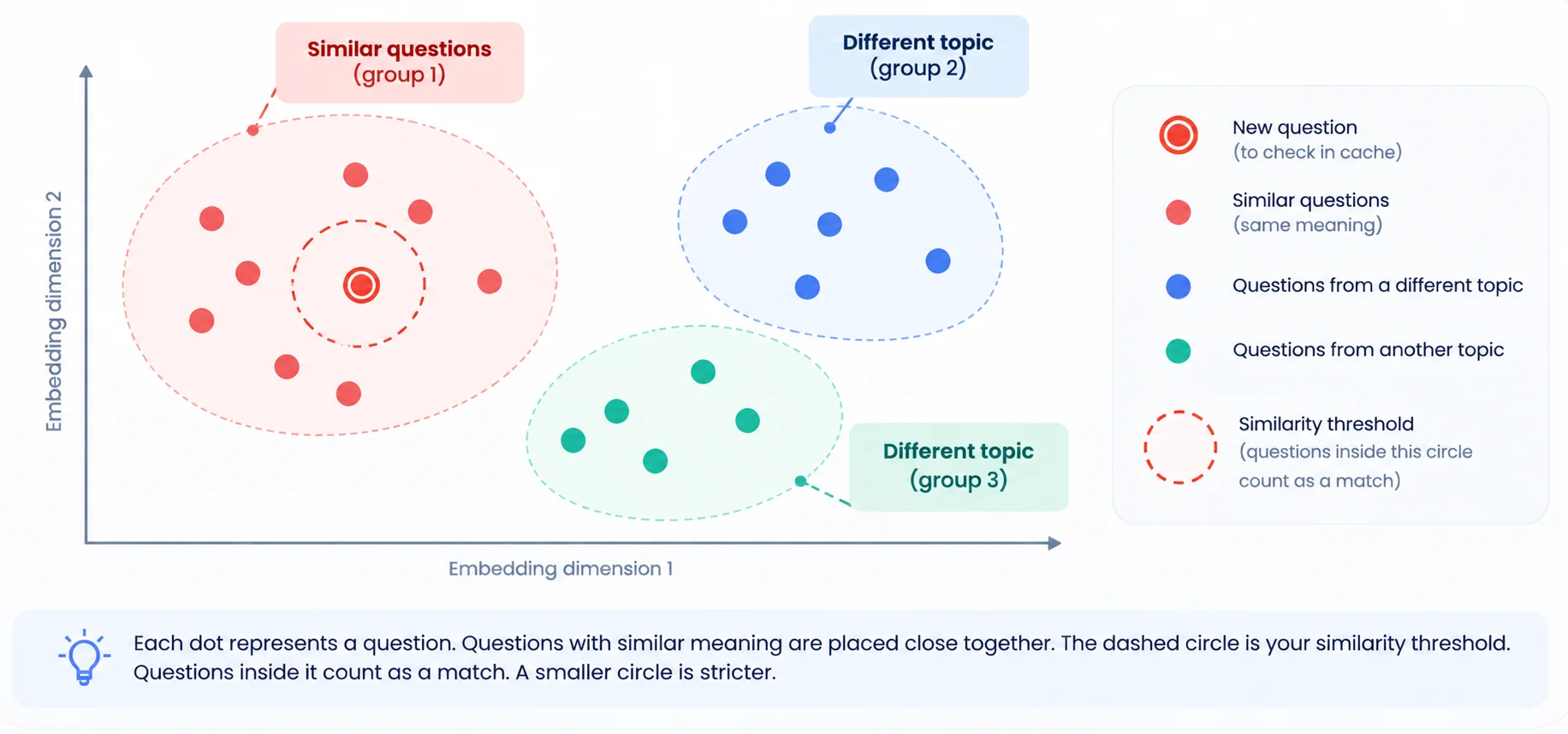
An embedding is a list of numbers that represents the meaning of a piece of text. It helps a computer understand how closely two sentences are related.

For example:

“How do I reset my password?”
“I forgot my password. How can I change it?”

The words are different, but their meaning is similar, so their embeddings will also be close.

What Is an Embedding and Why Does Semantic Caching Need It

Now, semantic caching uses embeddings to compare the meaning of a new question with questions already stored in the cache.

Similar embeddings → Similar meaning → Reuse the saved answer

Different embeddings → Different meaning → Send the question to the LLM

A common way to measure this similarity is cosine similarity, where a score closer to 1 means the two texts are more similar.

How Does Semantic Caching Work, Step by Step?

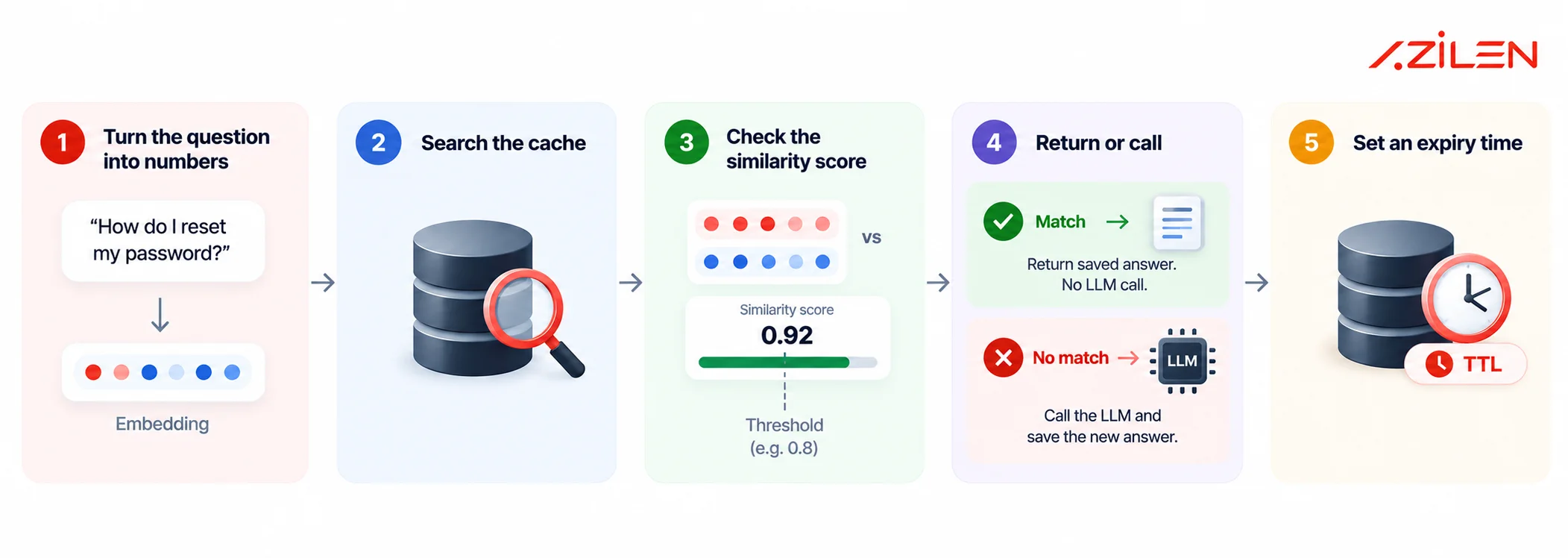
Semantic Cache Workflow Infographic

1. Turn the question into numbers

An embedding model converts the question into a list of numbers called a vector. These numbers represent the meaning of the question.

2. Search the cache

The system compares the new question’s vector with vectors stored in the cache to find previously answered questions with similar meanings.

3. Check the similarity score

The system calculates how similar the questions are. If the score reaches the chosen threshold, the system treats the previous question as a match.

4. Return or call

If there is a match, the system returns the saved answer without calling the LLM. If not, it asks the LLM and saves the answer.

5. Set an expiry time

Each cached answer gets a time-to-live (TTL). Once that time ends, the saved answer expires and is removed, keeping the cache fresh.

What is the difference between prompt caching vs semantic caching?

They sound alike, but they do different jobs. You can use both.

Prompt Caching Exact-Match Cache Semantic Caching
What is saved The start of the prompt A full answer A full answer
Does the LLM run? Yes, a fresh answer No No
Matches on Same prompt prefix Same text Same meaning
Main risk Low None for wrong matches Wrong or stale answers

With prompt caching, the model still generates a new answer. It simply reuses cached parts of the input, which can reduce cost and latency.

Google Cloud’s prompt caching documentation also explains how prompt caching reuses repeated input content.

How much does semantic caching save? A worked example

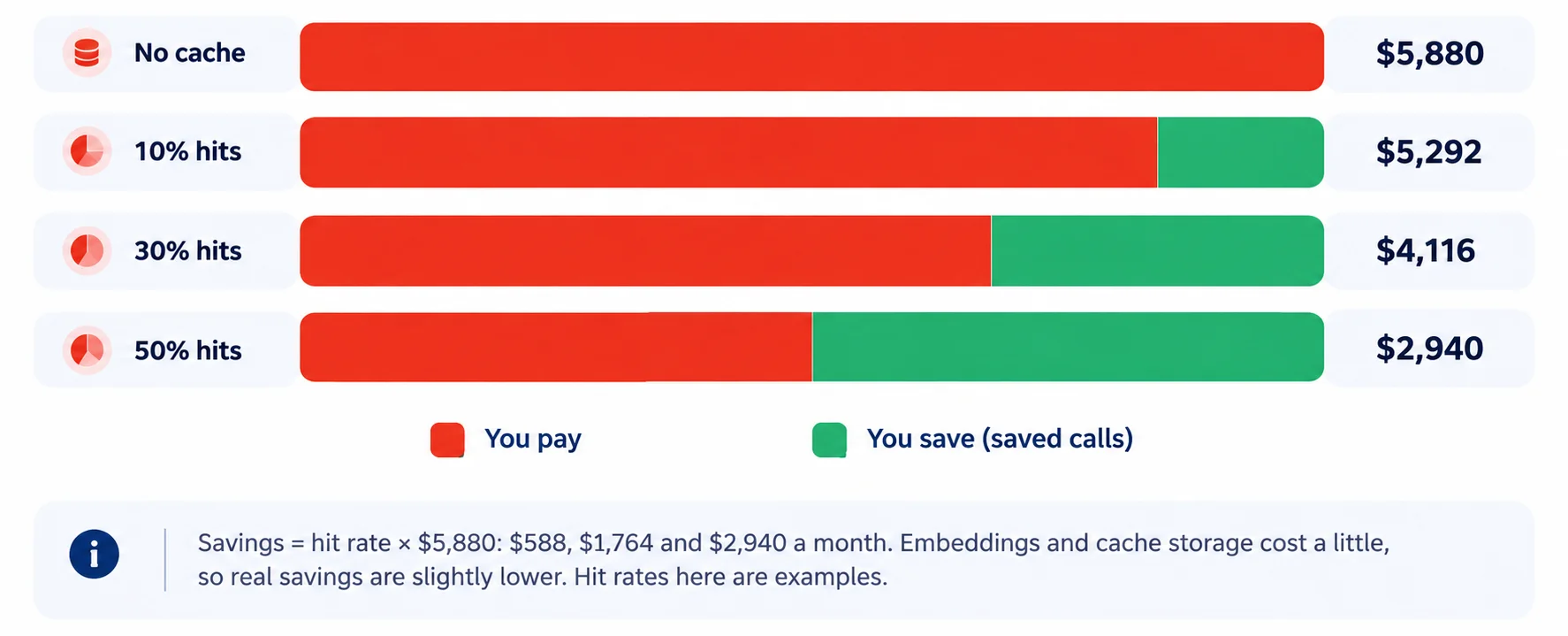
Let’s use a simple support-bot example. Each request has 7,550 input tokens and 450 output tokens. At Claude Sonnet 5.5 pricing, one request costs around $0.0196.

At 10,000 requests per day, that adds up to about $5,880 per month.

This is where semantic caching for LLMs can make a big difference. When a new question has a similar meaning to a cached question, the system can return the saved response instead of making another LLM API call.

Infographic showing cost savings: red 'You pay' portions vs green 'You save' portions, with right-side amounts ($5,880; $5,292; $4,116; $2,940).

It can also make responses faster. A study showed that a cache hit reduced response time from 2.7 seconds to 0.3 seconds. Semantic caching can also reduce API calls by up to 68.8%.

The actual savings depend on your semantic cache hit rate, how often users ask similar questions, response size, and LLM pricing. The more repeated or similar queries your application receives, the more LLM costs and latency semantic caching can help reduce.

Try it: Work out your own semantic caching savings

Cache hit rate: 38%

You pay You save
Monthly bill, no cache
Net saving a month
New monthly bill

Uses 30 days. Add the cost of embeddings and cache storage in the third box. The hit rate is your guess. Measure it before you promise savings.

Where does semantic caching go wrong?

Semantic caching can save cost and improve speed, but matching by meaning can sometimes return the wrong answer. Here are five common problems:

Problem Example Fix
Wrong match “What is Python?” gets an answer about Java. Raise the similarity threshold and test with real questions.
Stale answer A saved price or policy is no longer up to date. Use short TTLs for frequently changing information.
Shared private answer One user sees another user's account balance. Never cache personal answers. Separate caches by customer.
Mixed topics Support and product questions share the same cache. Separate the cache by topic or use case.
No testing The similarity threshold is chosen without real testing. Measure how often cached answers are actually correct.

The risk is real. A poorly tuned cache can produce a false-positive rate as high as 99%, meaning it may confidently return an incorrect answer. Read the false-positive example

For stale answers, use TTL based on how quickly the information changes. Time-sensitive data may need a TTL of 30–300 seconds, while stable content such as documentation can use 3,600 seconds or more.

How do you set a safe semantic caching similarity threshold?

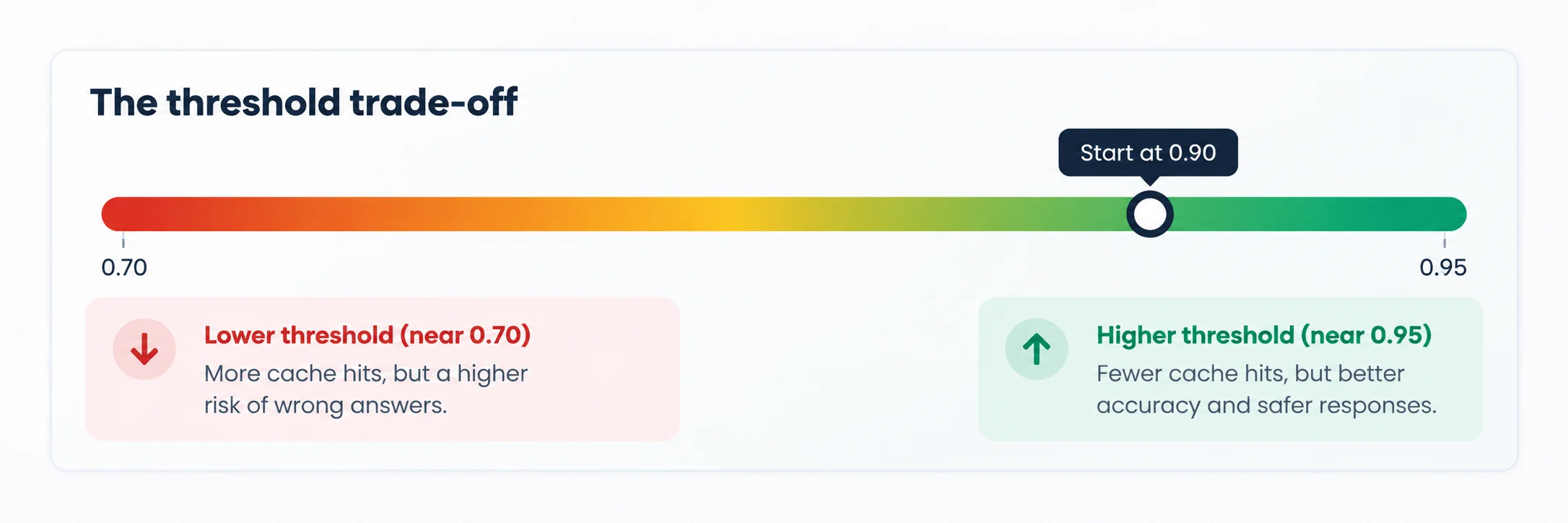
The similarity threshold is the score two questions must reach for the system to treat them as a match. A typical range is 0.7 to 0.95.

→ Lower threshold: More cache hits, but a higher risk of wrong answers.

→ Higher threshold: Fewer cache hits, but better accuracy and safer responses.

The right threshold depends on your use case, data, and risk level. Test it with real user questions before using it in production.

How do you set a safe semantic caching similarity threshold

How does Azilen use semantic caching?

At Azilen, semantic caching is one of three levers in the token optimization pillar of our APEX framework. The other two are context engineering and model routing. APEX also includes hallucination guards, so caching should never make an AI response less safe.

→ We use semantic caching where questions repeat and the answer is safe to reuse.

→ We test the cache with real user questions before using it in production.

→ We set clear TTL rules so cached answers do not stay longer than needed.

Azilen team culture

Balance is part of our culture.

Our logo is inspired by orbits, where two forces work together to keep a planet steady. Semantic caching needs the same balance: speed and cost savings on one side, accuracy and safety on the other.

Our ORBIT values of Openness and Trust mean we keep the results clear, so you can understand both the cache hit rate and the error rate.

How do you know if your semantic cache is working?

Do not trust a cache you cannot measure. Track these key semantic caching metrics:

→ Cache hit rate: Track exact matches and semantic matches separately. This shows whether the cache is actually reducing LLM calls.

→ Similarity score spread: Check how close cache hits are to your threshold. Hits that barely cross the threshold may need closer review.

→ Embedding and lookup time: The cache should respond faster than calling the LLM. Otherwise, the performance benefit may be limited.

→ Answer quality: Compare cached answers with fresh LLM responses. Review a sample regularly to catch incorrect matches.

→ Set alerts: Watch for sudden changes in hit rate, unusual similarity scores, or slower lookups. These can indicate changes in user questions, data, or the embedding model.

When should you use semantic caching?

Good fit

FAQ bots, customer support, knowledge bases and RAG apps, where people ask similar questions and one answer fits all.

Bad fit

Personal answers, live data, and tasks
that need a fresh, unique reply
every time.

It also needs the math to work. The LLM bill must be bigger than the cost of embeddings, the vector store and upkeep.

Optimize Your LLM Costs Without Compromising Quality

With 17+ years of experience as an Enterprise AI Development Company, Azilen helps businesses build efficient, scalable, and reliable AI solutions for real-world use. Our expertise in LLM token optimization helps enterprises reduce AI costs while maintaining response quality and accuracy.

→ Optimize AI costs: Reduce unnecessary token usage and improve the efficiency of LLM-powered applications.

→ Build smarter AI systems: Use context engineering, semantic caching, and model routing to improve performance and control AI costs.

→ Scale with confidence: Build secure, reliable, and scalable AI solutions that can grow with your business.
With the right approach, AI can deliver better results without unnecessary costs. Azilen helps enterprises find the right balance between performance, quality, scalability, and cost.

Wasting Tokens, Rising AI Costs, and Unoptimized LLMs?
Build efficient, scalable, and production-ready LLM solutions with Azilen.

Top FAQs on Semantic Caching for LLMs

1. What is semantic caching in LLM applications?

Semantic caching stores previous LLM responses and reuses them when a new question has a similar meaning. This reduces repeated LLM calls, lowers token usage, cuts costs, and can improve response speed.

2. How can Azilen help reduce LLM costs with semantic caching?

Azilen uses semantic caching along with context engineering and model routing to reduce unnecessary LLM calls. This approach helps enterprises optimize token usage, control AI costs, improve application performance, and maintain response quality.

3. Can semantic caching return the wrong answer?

Yes. If the similarity threshold is too low, semantic caching may treat different questions as similar and return the wrong response. Testing real user queries and setting a safe threshold helps reduce this risk.

4. How do I choose the right semantic caching threshold?

Start by testing different similarity thresholds with real user questions. A higher threshold generally provides safer matches, while a lower threshold increases cache hits. Choose the level that provides the right balance.

5. Is semantic caching safe for personal or sensitive data?

Semantic caching can create risks when responses contain personal or sensitive information. Avoid sharing these answers through common caches, separate customer data, and apply appropriate access controls to prevent accidental exposure.

6. When should I avoid using semantic caching?

Avoid semantic caching for live data, personalised responses, and tasks requiring a fresh answer every time. It may also be unsuitable when embedding, storage, and maintenance costs are higher than the savings.

author avatar
Swapnil Sharma Vice President – Strategic Consulting
Swapnil Sharma is VP – Strategic Consulting at Azilen Technologies with expertise in digital transformation, presales, and business strategy. He has led 750+ RFPs and helps organizations drive technology-led growth through consultative solutions.
google
Swapnil Sharma
Swapnil Sharma
VP - Strategic Consulting

Swapnil Sharma is a strategic technology consultant with expertise in digital transformation, presales, and business strategy. As Vice President - Strategic Consulting at Azilen Technologies, he has led 750+ proposals and RFPs for Fortune 500 and SME companies, driving technology-led business growth. With deep cross-industry and global experience, he specializes in solution visioning, customer success, and consultative digital strategy.

Related Insights

GPT Mode
AziGPT - Azilen’s
Custom GPT Assistant.
Instant Answers. Smart Summaries.